

- Requirements
- Usage
- Resources - View-DEMO- DOCUMENTATION AND VIDEO TUTORIAL-Youtube
- Column Type should be longtext in Database table
- recorded JSON data to column in Database
- How can I use recorded JSON format in frontend
jQuery.filer - Simple HTML5 file uploader, a plugin tool for jQuery which change completely file input and make it with multiple file selection, drag&drop support, different validations, thumbnails, icons, instant upload, print-screen upload and many other features and options.
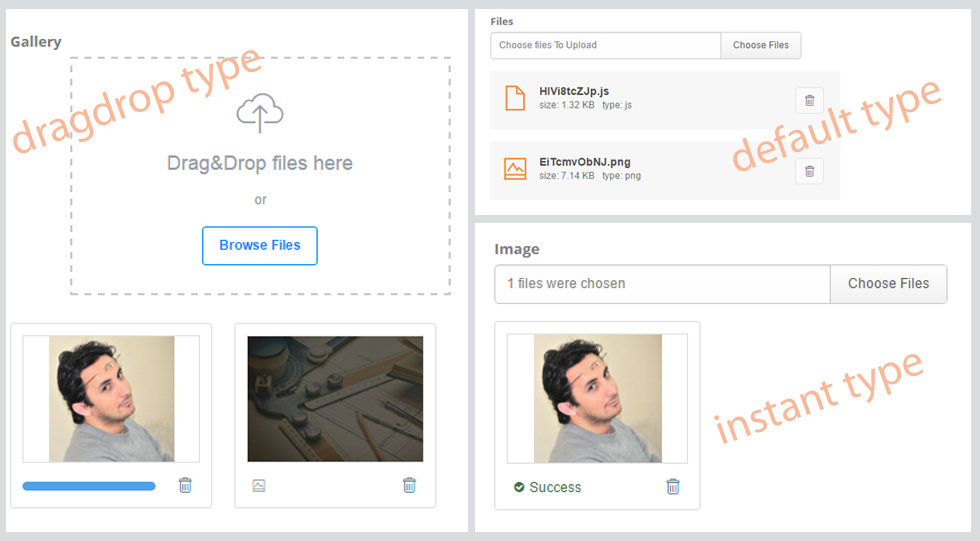
Download and Extract the release file under protected/extensions
Requirements 
Yii 1.1 or above
Usage 
Images and files are stored in the upload folder. You should create folders inside this directory. These folders must be writable.You may change this directory using {uploadDir} parametre.
view:
<?php echo $form->labelEx($model,'table_columnName',array('class'=>'')); ?>
<?php
$this->widget('ext.euploadmam.EuploadmamWidget',array(
	'model'=>$model,
	'attribute' => 'table_columnName',
	'actionUpload'=>Yii::app()->createUrl('site/upload'),
	'actionRemoveFile'=>Yii::app()->createUrl('site/removeFile'),
	'limit'=>4,
	'maxSize'=>4, //4MB,
	#'extensions'=>array('jpg','png','gif'),//etc
	'uploadDir'=>'upload/',
	'view'=>'default',//dragdrop,instant
	#'title'=>array('auto',10),
	#'removeConfirmation'=>false,
));
?>
<?php echo $form->error($model,'table_columnName',array('class'=>'')); ?>
siteController:
You can use code blocks like the following in siteController, copy paste only
public function actionRemoveFile()
	{
		$uploadDir=$_POST['uploadDir'];
		if(isset($_POST['file'])){
			$file = $uploadDir . $_POST['file'];
			if(file_exists($file)){
				unlink($file);
			}
		}
	}
	public function actionUpload()
	{
		require_once(Yii::app()->basePath.'/extensions/euploadmam/assets/php/class.uploader.php');
		$uploader 	= new Uploader();
		$limit		=$_POST['limit'];
		$maxSize	=$_POST['maxSize'];
		$extensions	=json_decode($_POST['extensions'],true);
		$uploadDir	=$_POST['uploadDir'];
		$title		=json_decode($_POST['title'],true);
		$name		=$_POST['name'];
		$data 		= $uploader->upload($_FILES["$name"], array(
			'limit' => $limit, //Maximum Limit of files. {null, Number}
			'maxSize' => $maxSize, //Maximum Size of files {null, Number(in MB's)}
			'extensions' => $extensions, //Whitelist for file extension. {null, Array(ex: array('jpg', 'png'))}
			'required' => false, //Minimum one file is required for upload {Boolean}
			'uploadDir' => $uploadDir, //Upload directory {String}
			'title' => $title,//New file name {null, String, Array} *please read documentation in README.md
			'removeFiles' => true, //Enable file exclusion {Boolean(extra for jQuery.filer), String($_POST field name containing json data with file names)}
			'perms' => null, //Uploaded file permisions {null, Number}
			'onCheck' => null, //A callback function name to be called by checking a file for errors (must return an array) | ($file) | Callback
			'onError' => null, //A callback function name to be called if an error occured (must return an array) | ($errors, $file) | Callback
			'onSuccess' => null, //A callback function name to be called if all files were successfully uploaded | ($files, $metas) | Callback
			'onUpload' => null, //A callback function name to be called if all files were successfully uploaded (must return an array) | ($file) | Callback
			'onComplete' => null, //A callback function name to be called when upload is complete | ($file) | Callback
			'onRemove' => 'onFilesRemoveCallback' //A callback function name to be called by removing files (must return an array) | ($removed_files) | Callback
		));

		if($data['isComplete']){

			$record=[];
			$record['name']			=$data['data']['metas'][0]['name'];
			$record['extension']	=$data['data']['metas'][0]['extension'];
			$record['size']			=$data['data']['metas'][0]['size'];
			$record['type']			=$data['data']['metas'][0]['type'][0];
			#$files 				=$data['data']['metas'][0];
			print_r(json_encode($record));
		}

		if($data['hasErrors']){
			$errors = $data['errors'];
			print_r($errors);
		}

		function onFilesRemoveCallback($removed_files){
			foreach($removed_files as $key=>$value){
				$file = $uploadDir . $value;
				if(file_exists($file)){
					unlink($file);
				}
			}

			return $removed_files;
		}
	}
Resources - View-DEMO- DOCUMENTATION AND VIDEO TUTORIAL-Youtube 
...external resources for this extension...
Column Type should be longtext in Database table 
table column type of uploaded file should be longtext in database because sent to column data is JSON format. for example table format:
CREATE TABLE IF NOT EXISTS `blog` (
  `id` int(11) NOT NULL AUTO_INCREMENT,
  `blogTitle` varchar(255) COLLATE utf8_turkish_ci NOT NULL,
  `image` longtext COLLATE utf8_turkish_ci,
  `gallery` longtext COLLATE utf8_turkish_ci,
  `files` longtext COLLATE utf8_turkish_ci,
  PRIMARY KEY (`id`)
) ENGINE=InnoDB DEFAULT CHARSET=utf8 COLLATE=utf8_turkish_ci AUTO_INCREMENT=1 ;
recorded JSON data to column in Database 
[{"name":"ARDY945erP.txt","extension":"txt","size":"3683","type":"text"},{"name":"HNgXx7LnGw.jpg","extension":"jpg","size":1070,"type":"image"},{"name":"fZlgr1J_SB.html","extension":"html","size":0,"type":"text"}]
How can I use recorded JSON format in frontend 
For example we can call image name using following code block
<?php
$model=Blog::model()->findByPk(13);
$json_column=json_decode($model->gallery);
?>
<?php if (sizeof($json_column)>0): ?>
	 <?php foreach($json_column as $key =>$value):?>
		<?php echo $value->name.'<br/>'; //HNgXx7LnGw.jpg?>
	<?php endforeach;?>
<?php endif;?>
 web_dew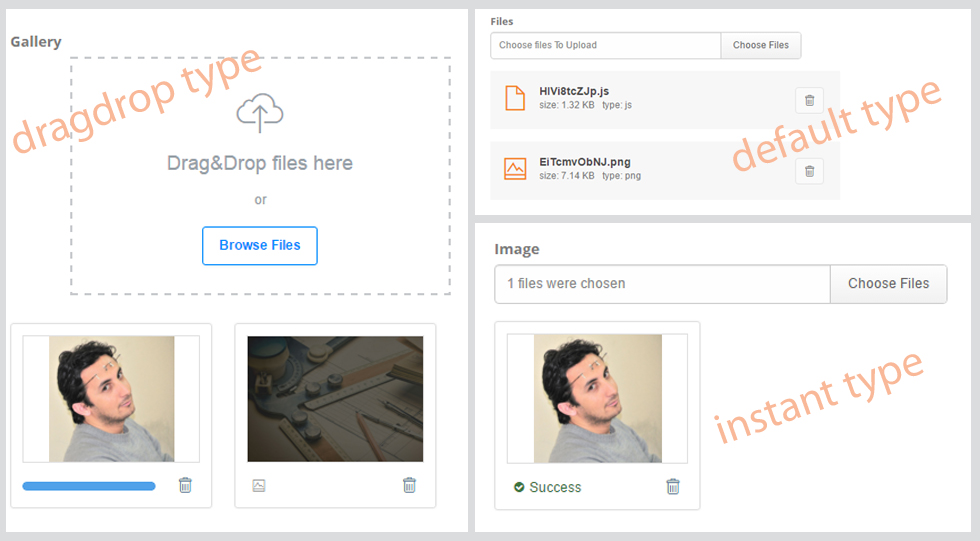
User Contributed Notes
Leave a comment
If you have any questions, please ask in the forum instead.
Join the conversation to share a note.