

Yii2 Postman Generator 
- Why
- Installation
- Usage
- Annotation reference
- Programmatic use
- Keep it in sync with CI
- Requirements
- Contributing
- License


Keep your Postman collection in sync with your Yii2 API. Annotate your controller actions, run one command, and import the result into Postman, Insomnia, Bruno or Hoppscotch.
No OpenAPI spec to write and maintain, no extra dependencies: only Yii2.
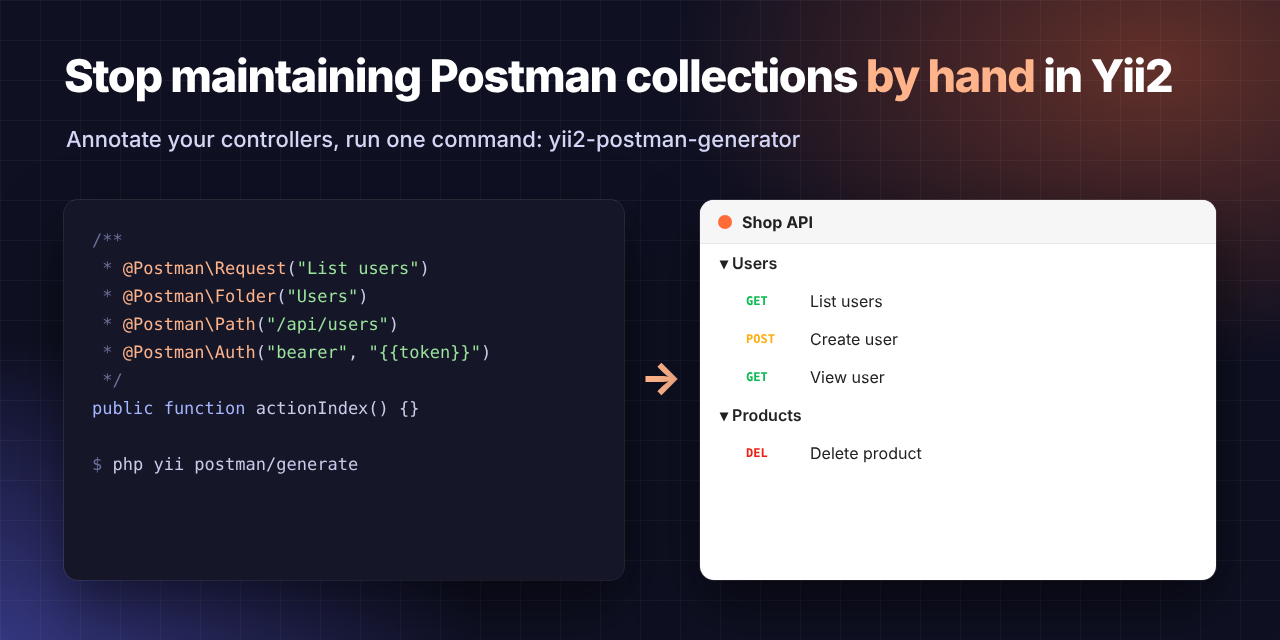
/**
 * @Postman\Request("Create user")
 * @Postman\Folder("Users")
 * @Postman\Method("POST")
 * @Postman\Path("/api/users")
 * @Postman\Auth("bearer", "{{token}}")
 * @Postman\Body({"name": "John Doe", "email": "john@example.com"})
 */
public function actionCreate() { /* ... */ }
$ php yii postman/generate
Scanning:
  - /var/www/app/controllers

✓ 12 request(s) written to /var/www/app/docs/api.postman_collection.json
See a full generated file in docs/example.postman_collection.json.
Why 
- The docs live next to the code. When you change an endpoint, the annotation is right there.
- One command, repeatable. Run it in CI and commit the JSON, so the collection never drifts.
- Postman Collection v2.1. It imports into Postman, Insomnia, Bruno, Hoppscotch and anything else that reads that format.
- Lightweight. Unlike Swagger/OpenAPI tooling, you only describe what a client needs to call the endpoint.
Installation 
composer require --dev iguazoft/yii2-postman-generator
The extension registers the postman console command automatically through Yii2's extension bootstrap. Nothing to configure.
Usage 
1. Annotate your controllers 
<?php

namespace app\controllers;

use yii\rest\Controller;

/**
 * @Postman\Collection("Shop API")
 * @Postman\Description("Public API used by the mobile app")
 * @Postman\BaseUrl("https://api.shop.test")
 * @Postman\Variable("apiVersion", "v1")
 */
class UserController extends Controller
{
    /**
     * @Postman\Request("List users")
     * @Postman\Folder("Users")
     * @Postman\Path("/api/users")
     * @Postman\Auth("bearer", "{{token}}")
     * @Postman\Query("page", "1")
     * @Postman\Query("per-page", "20")
     */
    public function actionIndex() { /* ... */ }

    /**
     * @Postman\Request("View user")
     * @Postman\Folder("Users")
     * @Postman\Path("/api/users/{id}")
     */
    public function actionView($id) { /* ... */ }
}
Only actions with @Postman\Request are exported.
2. Generate 
php yii postman/generate
| Option | Alias | Default | Description |
|---|---|---|---|
--output | -o | @app/docs/api.postman_collection.json | Output file. Yii aliases allowed. |
--dirs | -d | @app/controllers | Comma separated directories, scanned recursively. |
--name | -n | @Postman\Collection or API Collection | Collection name. |
--base-url | -u | @Postman\BaseUrl or http://localhost | Value of {{baseUrl}}. |
--include-hidden | -a | false | Also export actions marked @Postman\Hidden. |
php yii postman/generate -d=@app/modules/api/v1/controllers,@app/modules/api/v2/controllers -o=@app/docs/api.json
php yii postman/help   # annotation reference
3. Import 
In Postman: Import → File → api.postman_collection.json. Set token in the collection variables and you are ready.
Annotation reference 
Class level 
| Annotation | Description |
|---|---|
@Postman\Collection("Name") | Collection name. The first one found wins. |
@Postman\Description("Text") | Collection description. |
@Postman\BaseUrl("https://api.example.com") | Default value of {{baseUrl}}. |
@Postman\Variable("key", "value") | Collection variable. Repeatable. |
Action level 
| Annotation | Description |
|---|---|
@Postman\Request("Name") | Required. Request name. |
@Postman\Method("POST") | HTTP method. Default GET. |
@Postman\Path("/api/users/:id") | Path. :id and {id} become Postman path variables. |
@Postman\Folder("Users") | Folder to group the request in. |
@Postman\Description("Text") | Request description. |
@Postman\Auth("bearer", "{{token}}") | Bearer token. |
@Postman\Auth("basic", "{{user}}", "{{pass}}") | Basic auth. |
@Postman\Auth("apikey", "X-Api-Key", "{{apiKey}}") | API key header. |
@Postman\Body({...}) | JSON body. Can span several lines. |
@Postman\Header("key", "value") | Request header. Repeatable. |
@Postman\Query("key", "value") | Query parameter. Repeatable. |
@Postman\Hidden | Not exported unless --include-hidden. |
Arguments can use double quotes, single quotes, or no quotes. Quoted values may contain commas and parentheses.
Programmatic use 
use iguazoft\postman\PostmanGenerator;

$generator = new PostmanGenerator([
    'scanDirs' => ['@app/controllers', '@app/modules/api/controllers'],
    'collectionName' => 'My API',              // optional, overrides @Postman\Collection
    'variables' => ['baseUrl' => 'https://api.example.com'],
    'includeHidden' => false,
]);

$generator->generate('@app/docs/api.postman_collection.json'); // write a file
$json = $generator->generateJson();                           // or get the JSON
$array = $generator->generateArray();                         // or the array
Keep it in sync with CI 
# .github/workflows/postman.yml
- run: php yii postman/generate -o=@app/docs/api.postman_collection.json
- run: git diff --exit-code docs/api.postman_collection.json || (echo "Run php yii postman/generate and commit the result" && exit 1)
Requirements 
- PHP 7.4 to 8.4
- Yii 2.0
Contributing 
Issues and pull requests are welcome.
composer install
composer test
License 
MIT. See LICENSE.
 Danny Rios Tolosa
User Contributed Notes
Leave a comment
If you have any questions, please ask in the forum instead.
Join the conversation to share a note.