Captcha In Yii Framework Don't Appear (Show)
#1
Posted 10 January 2013 - 11:40 AM
------Model--------
public $verifyCode;
public function rules()
{
return array(array('verifyCode', 'captcha', 'allowEmpty'=>!CCaptcha::checkRequirements()),
);
}
public function attributeLabels()
{
return array('verifyCode'=>'Verification Code', );
}
--------Controller
public function actions(){
return array(
// captcha action renders the CAPTCHA image displayed on the user registration page
'captcha'=>array(
'class'=>'CCaptchaAction',
'backColor'=>0xFFFFFF,
),
);
}
public function accessRules()
{
return array(
array('allow', 'actions'=>array('create','update','captcha'),
'users'=>array('@'),),
);
}
-------------------View--------------
<?php $form=$this->beginWidget('CActiveForm', array(
'id'=>'project-form',
'enableAjaxValidation'=>false,
));
?>
<?php if(CCaptcha::checkRequirements()): ?>
<div class="row">
<?php echo $form->labelEx($model,'verifyCode'); ?>
<div>
<?php $this->widget('CCaptcha'); ?>
<?php echo $form->textField($model,'verifyCode'); ?>
</div>
<div class="hint">Please enter the letters as they are shown in the image above.
<br/>Letters are not case-sensitive.</div>
<?php echo $form->error($model,'verifyCode'); ?>
</div>
<?php endif; ?>
<div class="row buttons">
<?php echo CHtml::submitButton($model->isNewRecord ? 'Create' : 'Save'); ?>
</div>
<?php $this->endWidget(); ?>

#3
Posted 11 January 2013 - 05:06 AM
In rules you have:
return array(
array('allow', 'actions'=>array('create','update','captcha'),
'users'=>array('@'),),
);
#4
Posted 11 January 2013 - 11:52 AM
Attached File(s)
-
yii framework.JPG (14.88K)
Number of downloads: 13
#5
Posted 11 January 2013 - 12:29 PM
public function accessRules()
{
return array('allow', 'actions' => array('captcha'), 'users' => array('*'));
}
try to change the '@' ('users' => array('*')) with '*'.
Thanks
#7
Posted 11 January 2013 - 12:54 PM
Rvr101, on 11 January 2013 - 12:29 PM, said:
public function accessRules()
{
return array('allow', 'actions' => array('captcha'), 'users' => array('*'));
}
try to change the '@' ('users' => array('*')) with '*'.
Thanks
http://freakshare.co...h2/999.rar.html
index.php?r=site/login -> work
index.php?r=users/create -> dont work
#8
Posted 11 January 2013 - 12:56 PM
Is it work in your Yii application contact form..?
#10
Posted 11 January 2013 - 11:28 PM
public function actions()
{
return array(
// captcha action renders the CAPTCHA image displayed on the contact page
'captcha'=>array(
'class'=>'CCaptchaAction',
'backColor'=>0xFFFFFF,
),
);
}
In model
a. Define the variable
public $verifyCode;
b. Add variable in access rules
public function rules()
{
return array(
array('verifyCode', 'captcha', 'allowEmpty'=>!CCaptcha::checkRequirements()),
);
}
In the view file
<?php if(CCaptcha::checkRequirements()): ?>
<div class="row"><tr>
<div>
<?php echo $form->labelEx($model,'verifyCode'); ?>
<?php $this->widget('CCaptcha'); ?>
<?php echo $form->textField($model,'verifyCode'); ?>
<?php echo $form->error($model,'verifyCode'); ?>
</div>
<div class="hint">Please enter the letters as they are shown in the image above.
<br/>Letters are not case-sensitive.</div>
</div>
<?php endif; ?>
Thanks
#11
Posted 12 January 2013 - 06:14 AM
Rvr101, on 11 January 2013 - 11:28 PM, said:
public function actions()
{
return array(
// captcha action renders the CAPTCHA image displayed on the contact page
'captcha'=>array(
'class'=>'CCaptchaAction',
'backColor'=>0xFFFFFF,
),
);
}
In model
a. Define the variable
public $verifyCode;
b. Add variable in access rules
public function rules()
{
return array(
array('verifyCode', 'captcha', 'allowEmpty'=>!CCaptcha::checkRequirements()),
);
}
In the view file
<?php if(CCaptcha::checkRequirements()): ?>
<div class="row"><tr>
<div>
<?php echo $form->labelEx($model,'verifyCode'); ?>
<?php $this->widget('CCaptcha'); ?>
<?php echo $form->textField($model,'verifyCode'); ?>
<?php echo $form->error($model,'verifyCode'); ?>
</div>
<div class="hint">Please enter the letters as they are shown in the image above.
<br/>Letters are not case-sensitive.</div>
</div>
<?php endif; ?>
Thanks
doesn't work...
#12
Posted 11 March 2013 - 06:17 AM
I am experiencing a similar problem, with the captcha image not displaying on the host server, and yet on my localhost the captcha image is visible. I have tried the forums to get some help but I am stuck. I've tried changing all the files as displayed on this and other posts, but to no avail.
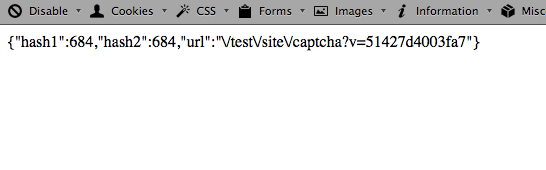
I am also experiencing issues when I click on 'Get a new code' on both localhost and on the server. The below output is shown on a blank white screen:
{"hash1":651,"hash2":651,"url":"\/index.php\/site\/captcha?v=513d69a205490"}
I don't know if this problem is related to the previous issue? All I know is that I have probably need to do some more reading about 'routing'.
If anyone can point me in the right direction it will be much appreciated. Thank you.
Yii 1.1.13
#13
Posted 14 March 2013 - 02:25 PM
gaz, on 11 March 2013 - 06:17 AM, said:
I am experiencing a similar problem, with the captcha image not displaying on the host server, and yet on my localhost the captcha image is visible. I have tried the forums to get some help but I am stuck. I've tried changing all the files as displayed on this and other posts, but to no avail.....
make sure that GD (GD2) extension is enabled in the php.ini config file.
If you liked my post, just give it a +1. that's all!
#14
Posted 14 March 2013 - 08:51 PM
faridplus, on 14 March 2013 - 02:25 PM, said:
Hi faridplus,
thanks for your help.
The server is configured for captcha according to the Yii's functional testsite file (see attached image).
Screen shot 2013-03-09 at 2.36.39 PM.png (17.4K)
Number of downloads: 5
So I am assuming that the host server php.ini file enables GD functionality. I'm in the process of upgrading to a new host environment in the next few days, so I will see if that helps.
I haven't quite worked out why on clicking the link "Get new code" generates this output though:
Screen shot 2013-03-15 at 12.45.56 PM.png (20.11K)
Number of downloads: 5
Cheers
#15
Posted 15 March 2013 - 02:52 AM
gaz, on 14 March 2013 - 08:51 PM, said:
thanks for your help.
The server is configured for captcha according to the Yii's functional testsite file (see attached image).
So I am assuming that the host server php.ini file enables GD functionality. I'm in the process of upgrading to a new host environment in the next few days, so I will see if that helps.
I haven't quite worked out why on clicking the link "Get new code" generates this output though:
Cheers
Hi, this time use Firebug and look at Net panel when you click on the 'Get a new code'. it should display 2 separate requests: one for getting that JSON object ({"hash" : ... , "url" : ...}) and another for loading the actual image. If any error happens, Firebug usually reports it.
If you liked my post, just give it a +1. that's all!
#16
Posted 17 March 2013 - 10:32 PM
faridplus, on 15 March 2013 - 02:52 AM, said:
Thanks faridplus for you time.
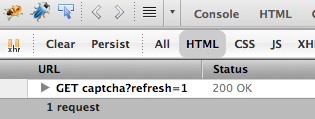
I get no error when I click on 'Get new code' when I view the result on Firebug and the Net panel.
Screen shot 2013-03-16 at 3.01.29 PM.png (21.33K)
Number of downloads: 4
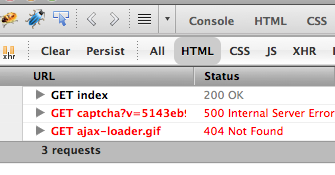
However, when I go to the index page of the web site I get this result:
Screen shot 2013-03-16 at 3.00.49 PM.png (26.25K)
Number of downloads: 4
Something is amiss with either my setup on the host server or my config files.
---------------------------------------------------------------------
Update:
To fix the issue regarding the missing 'captcha' image, I contacted my host provider to comment out the line in the php.ini file -
;error_reporting = E_ALL & ~E_DEPRECATED
and to turn 'safe_mode' to 'off'.
cheers
Gaz

Help