
The ERememberFiltersBehavior extension adds up some functionality to the default possibilites of CActiveRecord/Model implementation.
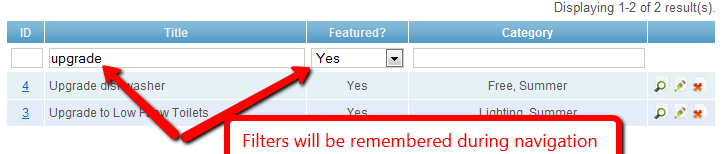
It will detect the search scenario and it will save the filters from the GridView. This comes handy when you need to remember them between navigation during page changes. For lot of navigation and heavy filtering, this functionality can be activated by just a couple of lines.
It supports default filter values and remember scenarios also. For example if you want to show only eg: Active Products, you can setup the default filter using this extension. Or if you have the same modal on different views, you can set different scenarios to remember state separated from each other. See the optional params under Advanced Functionalities and Scenarios section.
The source code is maintained on GitHub. You are welcome to contribute.
Requirements 
- Yii 1.1
Donate 
Resources 
Install 
We recommend installing the extension with Composer. Add this to the require section of your composer.json:
"pentium10/yii-remember-filters-gridview" : "dev-master"
You also need to include composer's autoloader:
require_once __DIR__.'/protected/vendor/autoload.php';
Usage 
Step 1 
To use this extension, just copy this file to your components/ directory, add 'import' => 'application.components.ERememberFiltersBehavior', [...] to your config/main.php and paste the following code to your behaviors() method of your model
public function behaviors() {
       return array(
           'ERememberFiltersBehavior' => array(
               'class' => 'application.components.ERememberFiltersBehavior',
			   'defaults'=>array(),           /* optional line */
			   'defaultStickOnClear'=>false   /* optional line */
           ),
       );
}
Step 2 
Your actionAdmin() must not use unsetAttributes() as this was moved to the extension.
With this extension the actionAdmin instead of the classic
public function actionAdmin()
        {
                $model=new Company('search');
                $model->unsetAttributes();  // clear any default values
                if(isset($_GET['Company']))
                        $model->attributes=$_GET['Company'];
                $this->render('admin',array(
                        'model'=>$model,
                ));
        }
can be as simple as:
public function actionAdmin()
        {
                $model=new Company('search');
                $this->render('admin',array(
                        'model'=>$model,
                ));
        }
Advanced Functionalities 
(if you use these functionalities please Donate)
'defaults' is a key value pair array, that will hold the defaults for your filters. For example when you initially want to display
active products, you set toarray('status'=>'1'). You can of course put multiple default values in the array.'defaultStickOnClear'=>true can be used, if you want the default values to be put back when the user clears the filters The default set is
falseso if the user clears the filters, also the defaults are cleared out, the user will get an absolutely clean filter form. Whentrue, if the form is cleared, he will get a form with defaults values.
Scenarios 
(if you use these functionalities please Donate)
You can use scenarios to remember the filters on multiple states of the same model. This is helpful when you use the same model on different views and you want to remember the state separated from each other.
Known limitations: the views must be in different actions (not on the same view)
To set a scenario add the setRememberScenario call after the instantiation Sample code:
public function actionAdmin()
        {
                $model=new Company('search');
				$model->setRememberScenario('scene1');
                $this->render('admin',array(
                        'model'=>$model,
                ));
        }
This extension has also a pair Clear Filters Gridview
Change Log 
The change log is maintained on GitHub. You are welcome to contribute.
remember, filters, cgridview, gridview, store, reload, controller, model, behavior, interface, widget, stick, scenario
 Pentium10
very helpful and easy to use
I added this behavior in the parent class for all my models; and then removed the actionAdmin from all my controllers and put it in the parent class (e.g. MyController) from which all my controllers descend. Now every admin page has this behavior. Quite simple.
indeed helpful and easy to use
@jeremy:
your idea is great, but how to handle model? should we also create parent model with the behavior method like above than inherits our model to this parent model?
I have a problem, my current actionAdmin() is
if(isset($_GET['Company']))
    $model->attributes=$_GET['Company'];
else
    $model->status=Company::ACTIVE;
my idea is to return only active companies in the gridview. after using this extensions how could I achieve it? hoe could I set default status = active in my admin?
thx a lot
Updated the extension to include defaults
@adinugro I've updated the extension to include support for defaults. Please setup the behavior in your model file, and there you can now set defaults. Donation is welcome for implementing this functionality in for you.
Great!
That's exactly what I was looking for!!
Thanx
This is what I needed. Seems to be working fine.
Great extension.
This is a great extension, thanks.
I have two different views that each have a CGridView for the same model (different layout). When I filter in one view, the values are then "remembered" in the other view. Do you know if there is a way to disable the "memory" in a specific CGridView? I quickly looked at the source, perhaps using the CGridView id instead of the modelName would work in the getState/setState? What do you think?
add cgridview id to the memory unique state label
@laqrhead You can alter the code of the extension and implement the gridview and model id. I will release in the upcoming days an update, that will include a configurable parameter to override the ID of the memory and other requested changes and bug fixes.
remember the page
it doesn't remember the page. using the latest vesion of yii...
pagination and sorting is for future
@bas_vdl This extension is designed to remember filter's values, sorting and pagination are other layers and probably will need a separate extension.
Persist the state in database
Would be great to persist de filter state in the database instead of the user session. This feature may enable the user to keep the prefered filters between sessions and between several computers.
Adding support to remeber sorting and active pager page
Hi, I think you can pretty easily add support for remebering sorting order and active page in pager like so:
// store also sorting order
$key = get_class($this).'_sort'; // e.g. Model_sort
if(!empty($_GET[$key])){
	$this->sort = $_GET[$key]; // update sorting key
}elseif(!empty($this->sort)){
	$_GET[$key] = $this->sort; // set latest sorting key
}

// store active page in page
$key = get_class($this).'_page'; // e.g. Model_page
if(!empty($_GET[$key])){
	$this->page = $_GET[$key]; // update current active page
}elseif(!empty($this->page)){
	$_GET[$key] = $this->page; // set latest active page
}
This should be placed into Model::search() function, whereas Model has two additional filter variables "sort" and "page".
Lubos
Adding support to remeber sorting and active pager page
Hi, Lubos.
Can you explain / provide example?
Thank you.
Remembering the page
thanks for this great extension.
I found a way to remember the page number (i'm not the author) at this address:
http://www.stupidannoyingproblems.com/2012/04/yii-grid-view-remembering-filters-pagination-and-sort-settings/
default is not working when scenario is set
Hi Pentium10,
I found out that when I set scenario, the default is no longer working. If I remove the setRememberScenario, it works again. Could you help with this?
Regards,
Daniel
Moved to GitHub
Code has been moved to GitHub, please kindly contribute to it.
2 improvements
Imho this ext. is so useful it should be in core. Thx to Pentium10!
To suit my needs i've made two changes:
Sometimes default values are not empty, and users set it to 0 or empty string (to show all of given cathegory). To make remember-filters-gridview save this values function readSearchValues can be changed this way:
~
`phpprivate function readSearchValues() {
$modelName = get_class($this->owner); $attributes = $this->owner->getSafeAttributeNames(); // set any default value if (is_array($this->defaults) && (null===Yii::app()->user->getState($modelName . __CLASS__. 'defaultsSet', null))) { foreach ($this->defaults as $attribute => $value) { if (null === (Yii::app()->user->getState($this->getStatePrefix() . $attribute, null))) { Yii::app()->user->setState($this->getStatePrefix() . $attribute, $value); } } Yii::app()->user->setState($modelName . __CLASS__. 'defaultsSet', 1); } // set values from session foreach ($attributes as $attribute) { if (null !== ($value = Yii::app()->user->getState($this->getStatePrefix() . $attribute, null))) { try { $this->owner->$attribute = $value; } catch (Exception $e) { } } } }rememberScenario
I have a model with a modified search action for a specific scenario and the saving of filters wouldn't work - so I modified doReadSave by checking for the remembered scenario too instead of just the default 'search' scenario. It seems to be working fine, but is this the best approach?
if ($this->owner->scenario == 'search' || $this->owner->scenario == $this->rememberScenario) {Remember page and sort
I've opened a pull for these changes on your GitHub repo.
http://www.stupidannoyingproblems.com/2012/04/yii-grid-view-remembering-filters-pagination-and-sort-settings/
Updated extension! Clear state if class $attribute is not set
@montegobay Extension has been updated, please grab the new version 1.2.1
Anyone had problems with this extension?
Hello,
I've used it in some projects and I had the problem of clearing one field.
For example:
I write some value to search in the "name" column and it saves to session, that's okay.
But then I come back and I leave "name" blank and hit enter again to clear the value, but guess what? It restores it back from session instead of clearing it.
Did someone had this issue or any idea why it happens? It doesn't happen always, but from time to time I cannot clear a specific field because it gets it back from session.
Thanks!
Issue with search name
I am applying your components as per your instructions and:
If I have something like this in my admin:
public function actionAdmin($id = null)
{
	$model = new OneWayInspection('searchSort');
	$this->render('admin', array(
		'model' => $model,
	));
}
there is no way it works.
This is the searchSort()
public function searchSort() {
        $criteria = new CDbCriteria;

		$criteria->with = "way";

        $criteria->compare('t.inspection_date', $this->inspection_date, true);
        $criteria->compare('t.inspector_id', $this->inspector_id);
        $criteria->compare('t.stop_id', $this->stop_id);
        $criteria->compare('t.way_id', $this->way_id);

		$sort = new CSort();
		$sort->attributes = array(
			'defaultOrder'=>'t.inspector_date, t.inspector_id, t.stop_id, way.route_time',
		);

        return new CActiveDataProvider($this, array(
            'criteria' => $criteria,
			'sort' => $sort
        ));
    }
Any idea?
Yii2
I used long this extension on Yii 1.1 and has done very well.
Can I use it in Yii 2?
Thanks.
Error on complex Filter and Sort
I had a big trouble with gridView when I used a complex filtering and sorting at the same time. The grid stucked a strange filter value, and no any clearing method was useful.
The offical Yii documentation said: " You can set this (CGridView -> AjaxType property) to 'POST' if you are filtering by many fields at once and have a problem with GET query string length."
When I used POST AjaxType, complex filtering and sorting methods was working properly without ERemberFiltersBehavior, but if i used Behavior It does not worked, because it uses $_GET against $_POST.
Solution: For both AjaxType you should replace $_GET to $_REQUEST in the ERemberFiltersBehavior.
private function doReadSave() { if ($this->owner->scenario == $this->scenarioName || $this->owner->scenario == $this->rememberScenario ) { $this->owner->unsetAttributes(); // store also sorting order $key = get_class($this->owner).'_sort'; if(!empty($_REQUEST[$key])){ Yii::app()->user->setState($this->getStatePrefix() . 'sort', $_REQUEST[$key]); }else { $val = Yii::app()->user->getState($this->getStatePrefix() . 'sort'); if(!empty($val)) $_REQUEST[$key] = $val; } // store active page in page $key = get_class($this->owner).'_page'; if(!empty($_REQUEST[$key])){ Yii::app()->user->setState($this->getStatePrefix() . 'page', $_REQUEST[$key]); }elseif (!empty($_REQUEST["ajax"])){ // page 1 passes no page number, just an ajax flag Yii::app()->user->setState($this->getStatePrefix() . 'page', 1); }else{ $val = Yii::app()->user->getState($this->getStatePrefix() . 'page'); if(!empty($val)) $_REQUEST[$key] = $val; } if (isset($_REQUEST[get_class($this->owner)])) { $this->owner->attributes = $_REQUEST[get_class($this->owner)]; $this->saveSearchValues(); } else { $this->readSearchValues(); } } }If you have any questions, please ask in the forum instead.
Signup or Login in order to comment.