

Easily add Highcharts, Highstock and Highmaps graphs to your Yii application.
About 
Highcharts 
Create interactive charts easily for your web projects. Used by tens of thousands of developers and 59 out of the world's 100 largest companies, Highcharts is the simplest yet most flexible charting API on the market.
Highstock 
Highstock lets you create stock or general timeline charts in pure JavaScript. Including sophisticated navigation options like a small navigator series, preset date ranges, date picker, scrolling and panning.
Highmaps 
Build interactive maps to display sales, election results or any other information linked to geography. Perfect for standalone use or in dashboards in combination with Highcharts!
Links 
Note: Highcharts is free for non-commercial use only. For more information, please visit the Highcharts License and Pricing page.
Requirements 
- Yii 1.0 or above
- PHP 5.1 or above
Installation 
- Extract the release file under
protected/extensions
Usage 
To use this widget, you may insert the following code in a view:
$this->Widget('ext.highcharts.HighchartsWidget', array(
   'options' => array(
      'title' => array('text' => 'Fruit Consumption'),
      'xAxis' => array(
         'categories' => array('Apples', 'Bananas', 'Oranges')
      ),
      'yAxis' => array(
         'title' => array('text' => 'Fruit eaten')
      ),
      'series' => array(
         array('name' => 'Jane', 'data' => array(1, 0, 4)),
         array('name' => 'John', 'data' => array(5, 7, 3))
      )
   )
));
By configuring the options property, you may specify the options that need to be passed to the Highcharts JavaScript object. Please refer to the demo gallery and documentation on the Highcharts website for possible options.
Alternatively, you can use a valid JSON string in place of an associative array to specify options:
$this->Widget('ext.highcharts.HighchartsWidget', array(
   'options' => '{
      "title": { "text": "Fruit Consumption" },
      "xAxis": {
         "categories": ["Apples", "Bananas", "Oranges"]
      },
      "yAxis": {
         "title": { "text": "Fruit eaten" }
      },
      "series": [
         { "name": "Jane", "data": [1, 0, 4] },
         { "name": "John", "data": [5, 7,3] }
      ]
   }'
));
Note: You must provide a valid JSON string (double quotes) when using the second option. You can quickly validate your JSON string online using JSONLint.
See /doc/examples for more usage examples.
Tips 
If you need to use JavaScript in any of your configuration options, use the
js:prefix. For instance:[php] ... 'tooltip' => array( 'formatter' => 'js:function(){ return this.series.name; }' ), ...Highcharts by default displays a small credits label in the lower right corner of the chart. This can be removed using the following top-level option.
[php]
...
'credits' => array('enabled' => false),
...
Since version 3.0.2, all adapters, modules, themes, and supplementary chart types must be enabled through the top-level 'scripts' option.
[php]
...
'scripts' => array(
     'highcharts-more',   // enables supplementary chart types (gauge, arearange, columnrange, etc.)
     'modules/exporting', // adds Exporting button/menu to chart
     'themes/grid'        // applies global 'grid' theme to all charts
),
...
Previous versions relied on auto-detection magic, but that became less reliable as Highcharts evolved. The new method more accurately follows the native process of including/excluding additional script files and gives the user some finer-grain control. For a list of available scripts, see the contents of
protected/extensions/highcharts/assets/.You can access the JavaScript chart object from another script like this:
[javascript]
var chart = $('#my-chart-id').highcharts();
where
my-chart-idis set via the top-levelidconfiguration option. Just make sure you register your script after the widget declaration so that it has a chance to initialize.
Change Log 
v5.0.2 (2016-11-16) 
- Upgraded Highcharts JS library to the latest release (5.0.2). See the Highcharts changelog for more information about what's new in this version.
v5.0.0 (2016-10-03) 
- Upgraded Highcharts JS library to the latest release (5.0.0).
v4.2.6 (2016-08-07) 
- Upgraded Highcharts JS library to the latest release (4.2.6).
v4.2.5 (2016-05-27) 
- Upgraded Highcharts JS library to the latest release (4.2.5).
v4.2.3 (2016-02-11) 
- Upgraded Highcharts JS library to the latest release (4.2.3).
v4.2.2 (2016-02-04) 
- Upgraded Highcharts JS library to the latest release (4.2.2).
v4.2.1 (2016-01-13) 
- Upgraded Highcharts JS library to the latest release (4.2.1).
v4.1.10 (2015-12-14) 
- Upgraded Highcharts JS library to the latest release (4.1.10).
v4.1.9 (2015-10-12) 
- Upgraded Highcharts JS library to the latest release (4.1.9).
v4.1.8 (2015-09-24) 
- Upgraded Highcharts JS library to the latest release (4.1.8).
v4.1.7 (2015-07-09) 
- Upgraded Highcharts JS library to the latest release (4.1.7).
- Resolved issue #12 by introducing new 'scriptPosition' option.
v4.0.4 (2014-09-19) 
- Upgraded Highcharts JS library to the latest release (4.0.4).
- Added HighmapsWidget.
- Added usage examples in /doc/examples.
- Resolved issue #8: Using Highcharts and Highstock on the same page throws error 16
Previous Releases 
- See the full changelog for earlier versions.
Please use the 'Comments' section only for reviews. If you have questions, requests, bug reports or other feedback, use the links above.
 Milo Schuman
User Contributed Notes 63
in a single word
amazing!
thanks very much!
Great job
Hi, milomilo. Great job. I just downloaded it and its working fine ! Thanks
version de php
necesita: PHP 5 >= 5.3.0
con una versión menor da error
Fatal error: Call to undefined function array_replace_recursive() in protected/extensions/highcharts/HighchartsWidget.php on line 94
can it work with ajax?
Hi, unfortunately i am not able to apply this with ajax call.
can this work upon ajax call?
thanks.
Yii Highcharts Widget now works with PHP 5.1 and 5.2
aravaro, thanks for the error info. I have just released version 0.3 which is compatible with earlier versions of PHP. Happy coding!
Version 0.3 missing HighchartsWidget.php
Could you please double check your recent 0.3 package? You seem to be missing "HighchartsWidget.php" All I see are the .js file. Thanks!
Version 0.3 (no longer) missing HighchartsWidget.php
Thank you, canreo, for pointing out the missing file. I re-uploaded the highcharts-v0.3.zip package with all files included. Cheers!
Problem sending data
Great extension!
By the way I was trying to populate data for series.
'series' => array(
     array('name' => 'Line1', 'data'=> array($dataY)),
      array('name' => 'Line2', 'data' => array(16, 16, 17))
  )
Where $dataY is an array like this:
Array ( [0] => 18 [1] => 18.5 [2] => 18.75 )
But the chart only displays well Line2 and Line1 only gets (8,8,8) I am doing something wrong?
Thanks.
Sample Pie Chart
Great Extension, it helps me...
How to display pie chart using highcharts?
Pie Chart
@sbasuki - You may have figured it out but for those who haven't; to pass data to a pie chart use a multidimensional array. For example:
'series' => array(
    array('type' => 'pie',
          'name' => 'Pie Chart',
          'data' => array(array(Foo, 1), array(Bar, 2), array(FooBar, 3)
         )
)
Great extention! Thank you!
@rulight Problem sending data
Hi, I had this problem too, and I found the solution.. if you do the chart in this way:
'series' => array(
array('name' => 'Average', 'data' => array($avlength, $avspeed,$totaltime)),and $avlength=23; the result of the chart is the label 2 and the value 3 (maybe this is a bug, I don't knoW) instead you must create the chart in this way:
'series' => array(
array('name' => 'Average', 'data' => array(array('av',$avlength),array('av',$avspeed),array('av',$totaltime))),In this way the result would be label 'av' and the correct value (23),
I think that this is what is happening to you : Array ( [0] => 18 [1] => 18.5 [2] => 18.75 )
the label is always 1 and the value is 8.....
too good to be true
another thing i'll have to pay a license for...
great extension btw!
gonna keep an eye on this
too good to be true
another thing i'll have to pay a license for...
great extension btw!
gonna keep an eye on this
nice
nice extention :)
thank you
Wonderful..
so great....
Thank you for highchart, thank you for milomilo. as a custom developer for office application, tools like this is very very very usefull...
Thanks again..
Update: New High-Chart Support Theme Option, easily.... greatttt.. thx milomilo...
why highchartis giving different results with similar data structure?
I am using high chart in my yii based application.
after querying the database I am storing the result in a associative array named $catexp
after printing the structure using print_r($catexp) I am getting follwing
Array ( [0] => Array ( [name] => Food [y] => 91 ) [1] => Array ( [name] => Utilities [y] => 9 ) )now this the structure of data which can be passed to highcart for generating pie chart.
but after passing this $catexp as data for pie chart I am getting wired output i.e. i am not getting the full chart and as the no. of entries increasing the chart becoming shorter and shorter.
although i made a similar manual array structure like this
$a = array('name'=> 'Opera','y'=>91);
        $b = array('name'=> 'Safari','y'=>9);
    	$c = array($a,$b);
print_r($c) gives
Array ( [0] => Array ( [name] => Opera [y] => 91 ) [1] => Array ( [name] => Safari [y] => 9 ) )and passed this variable as data for pie chart and i got the full chart.
So my question is what is wrong with my previous chart both the array structures are same but output is diff?????
Make sure data is correct type
If you use this:
'series' => array(
         array('name' => 'Number of Calls', 'data' => $data)
      )
where $data is supposed to by an array of integers, typecast them to integers to make it work.
foreach($dataArray as $ct){
	$data[]=(int) $ct;
}
Otherwise it will take the first integer and use it as the title and the second integer will be the value (the issue @rulight was having).
runtime notice fix
Try fix it out
if(isset($this->options['exporting']['enabled']))
from
// register exporting module if enabled via the 'exporting' option
if($this->options['exporting']['enabled'])
// register global theme if specified vie the 'theme' option
if($this->options['theme'])
Can it works with CActiveDataProvider?
Can it works with CActiveDataProvider, just like CGridView?How can I pass a dataprovider to Highcharts's series?Thanks!
yes
the best chart ever. thanks
Highcharts 2.2.1 has been released
2.2.1 has been released. Changelog here. Can you please include the newer version?
Typecast to float if not int
Several people seem to struggle with using data directly from a CActiveDataProvider. One suggestion has been to typecast to int. I needed floats, which I assumed my numbers were (must have been strings?!?). Either way, typecast to integer or float and the array from the data provider should work.
$data = $provider->getData(); $graph = array(); array_push($graph, (float) $myObject->value);The widget form of the example given in http://www.highcharts.com/demo/pie-basic
<div id="container" style="min-width: 400px; height: 400px; margin: 0 auto"></div>
<?php

$this->Widget('ext.highcharts.HighchartsWidget', array(
   'options'=>array(
      'chart'=> array(
			'renderTo'=>'container',
			'plotBackgroundColor'=> null,
			'plotBorderWidth'=> null,
			'plotShadow'=> false
		),
      'title' => array('text' => 'Browser market shares at a specific website, 2010'),
        'tooltip'=>array(
                'formatter'=>'js:function() { return "<b>"+ this.point.name +"</b>: "+ this.percentage +" %"; }'
                     ),
        'plotOptions'=>array(
			'pie'=>array(
				'allowPointSelect'=> true,
				'cursor'=>'pointer',
				'dataLabels'=>array(
					'enabled'=> true,
					'color'=>'#000000',
					'connectorColor'=>'#000000',
					'formatter'=>'js:function() { return "<b>"+ this.point.name +"</b>:"+this.percentage +" %"; }'

				                   )
			            )
		         ),

      'series' => array(
         array('type'=>'pie','name' => 'Browser share', 'data' => array(array('Firefox',45.0),array('opera',26.8),array('Safari',8.5),array('Opera',6.2),array('Others',0.7),array(
					'name'=>'Chrome',
					'y'=>12.8,
					'sliced'=>true,
					'selected'=>true
				    ))),

      )

   )
));

?>
Hope this would help someone trying for more customized chart dispaly.
-Sirin k
tooltips?
Has anyone had problems making the tooltips work?
EDIT: Using Yii 1.1.10, you need to replace the highcharts.js and the highcharts.src.js files with the latest ones from the highcharts website and tooltips will be fixed.
Refresh button
Is there any way to add a refresh button in ajax to refresh the chart?
version update howto ?
Today it's on Version 2.3.3 (2012-10-04) I must refresh plugin folder or wait for this extension upgrade ?
thanks
Congratulations
Thank you very much!!! excelent job
update
I updated this extension to the latest highcharts 2.3.5 and improved the way scripts are loaded
If the author or someone else are interested PM me
Directly contact the author
@manuel-84, I suggest that you PM the author directly and send your files.
Highcharts.getOptions().colors,
Thanks for share it! How can retrieve color array from highchart?
this js line-> var colors = Highcharts.getOptions().colors
how can do it in widget ?
thanks
Highchart not working in latest version 1.1.13
I have created my application in Yii framework version 1.1.9 and use highcharts for display data in graphical format. Its working awsome but today i have upgrade my framework version to 1.1.13. Now i can not get chart in latest version of framework.
Please help me.
update
I tried to contact the author but he still have to reply... I'll upload a new extension if needed
fork it
anyone fork repo? Then upgrade all ^_^
Awesome extension !
Thanks a lot for this :)
Is it possible to use the flags series type with this widget ? If so, could you please post an example of how to use it on a series ?
Thanks,
Jonathan
Re: Flag Series
Jonathan, flag series are currently only available via the highstock library. You would need to load that JavaScript file separately and proceed from there. See this forum post for more info.
excel export
hi,
i m looking for a way to export a chart to excel?
Blank Graph
Hello Guys, there seems to be a problem with stacked graphs and IE8. This code produces a blank graph in IE8, but shows the correct data in another context:
/*
$graphdata2 contains

Array ( [0] => Array ( [name] => < 1 month [data] => Array ( [0] => 334 [1] => 30 [2] => 41 [3] => 3335 ) ) [1] => Array ( [name] => >= 1 month <2 months [data] => Array ( [0] => 0 [1] => 10 [2] => 31 [3] => 48 ) ) [2] => Array ( [name] => >= 2 months <3 months [data] => Array ( [0] => 0 [1] => 0 [2] => 9 [3] => 30 ) ) [3] => Array ( [name] => >= 3 months <4 months [data] => Array ( [0] => 0 [1] => 0 [2] => 0 [3] => 10 ) ) [4] => Array ( [name] => >= 4 months <5 months [data] => Array ( [0] => 0 [1] => 0 [2] => 0 [3] => 0 ) ) [5] => Array ( [name] => >= 5 months <6 months [data] => Array ( [0] => 0 [1] => 0 [2] => 0 [3] => 0 ) ) [6] => Array ( [name] => >6 months [data] => Array ( [0] => 0 [1] => 0 [2] => 0 [3] => 0 ) ) )
*/

$categories2 = array('3 months ago','2 months ago','1 month ago','newest');
$bar_data2   = array(array(
                         'name' => '< 1 month',
                         'data' => $graphdata2['zero_thirty']
                     ),
                     array(
                         'name' => '>= 1 month <2 months',
                         'data' => $graphdata2['thirty_sixty']
                     ),
                     array(
                         'name' => '>= 2 months <3 months',
                         'data' => $graphdata2['sixty_ninety']
                     ),
                     array(
                         'name' => '>= 3 months <4 months',
                         'data' => $graphdata2['ninety_hundredtwenty']
                     ),
                     array(
                         'name' => '>= 4 months <5 months',
                         'data' => $graphdata2['hundredtwenty_hundredfifty']
                     ),
                     array(
                         'name' => '>= 5 months <6 months',
                         'data' => $graphdata2['hundredfifty_hundredeighty']
                     ),
                     array(
                         'name' => '>6 months',
                         'data' => $graphdata2['hundredeighty_openend']
                     )
             );

$this->Widget('ext.highcharts.HighchartsWidget', array(
   'options'=>array(
      'colors'   => array('#0000cc', '#cc0000', '#33cc66', '#660099', '#33ccff', '#ff9900', '#3399ff'),
      'chart'    => array('type' =>'column'),
      'title'    => array('text' => 'Graph for last 4 Months'),
      'xAxis'    => array(
                      'categories' => $categories2
                    ),
      'yAxis'     => array(
                       'min' => '0',
                       'max' => '300',
                       'title' => array(
                           'text' => 'Suppressed'
                        ),
                        'stackLabels' => array(
                          'enabled' => 'true',
                          'style'   => array(
                              'fontWeight' => 'bold',
                              'color' => '(Highcharts.theme && Highcharts.theme.textColor) || \'gray\''
                          )
                        )
                ),
       'plotOptions' => array('column' => array('stacking' => 0.2, 'borderWidth' => 0)),
       'series' => $bar_data2
       )
 ));
This line seems to be problematic:
'plotOptions' => array('column' => array('stacking' => 0.2, 'borderWidth' => 1)),When I remove this line, it works.
Any ideas?
How can i remove the print option?
Hi,
How can i remove the print option alone?
I got the option for removing the entire export icons listed on top right corner, but how can i remove only one and use the other?
'exporting' => array('enabled' => false),Re: How can i remove the print option?
You can find a solution here to work with individual buttons.
Adding link
How to adding link in bar/graph?
Enhancement on include additional javascript files such as highcharts-more.js
Highcharts version 3 released, there are additional charts and modules included in the new release.
Current extension auto include the highcharts-more.js by checking on the chart type options. There are some new chart types in version 3 not cater by the current extension, in order to support the new charts, modify to the extension is required. Meanwhile, Highcharts support multiple axes with different chart type by configure each of them in the series options, not in chart options. (Highcharts Demo - Multiple axes). This make the detection become much more difficult.
Also, the extension cater to include only exporting.js module, not for any others.
// register exporting module if enabled via the 'exporting' option
if(isset($this->options['exporting']['enabled']) && $this->options['exporting']['enabled'] === true) {
	$scriptFile = YII_DEBUG ? 'exporting.src.js' : 'exporting.js';
	$cs->registerScriptFile("$baseUrl/modules/$scriptFile");
}

// register supplemental chart types library if needed
if(isset($this->options['chart']['type']) && in_array($this->options['chart']['type'], array('gauge', 'arearange', 'areasplinerange', 'columnrange'))) {
	$scriptFile = YII_DEBUG ? 'highcharts-more.src.js' : 'highcharts-more.js';
	$cs->registerScriptFile("$baseUrl/$scriptFile");
}

// register global theme if specified via the 'theme' option
if(isset($this->options['theme'])) {
	$scriptFile = $this->options['theme'] . ".js";
	$cs->registerScriptFile("$baseUrl/themes/$scriptFile");
}
to overcome the problems mentioned above, i suggest to modify the code a little bit.
class HighchartsWidget extends CWidget {

	public $options = array();
	public $htmlOptions = array();
	public $scripts = array();
	public $themes = array();

	/**
	 * Renders the widget.
	 */
	public function run() {
		$id = $this->getId();
		$this->htmlOptions['id'] = $id;

		echo CHtml::openTag('div', $this->htmlOptions);
		echo CHtml::closeTag('div');

		// check if options parameter is a json string
		if(is_string($this->options)) {
			if(!$this->options = CJSON::decode($this->options))
				throw new CException('The options parameter is not valid JSON.');
			// TODO translate exception message
		}

		// merge options with default values
		$defaultOptions = array('chart' => array('renderTo' => $id));
		$this->options = CMap::mergeArray($defaultOptions, $this->options);
		$jsOptions = CJavaScript::encode($this->options);
		$this->registerScripts(__CLASS__ . '#' . $id, "var chart = new Highcharts.Chart($jsOptions);");
	}

	/**
	 * Publishes and registers the necessary script files.
	 *
	 * @param string the id of the script to be inserted into the page
	 * @param string the embedded script to be inserted into the page
	 */
	protected function registerScripts($id, $embeddedScript) {
		$basePath = dirname(__FILE__) . DIRECTORY_SEPARATOR . 'assets' . DIRECTORY_SEPARATOR;
		$baseUrl = Yii::app()->getAssetManager()->publish($basePath, false, 1, YII_DEBUG);
		$scriptFile = YII_DEBUG ? '/highcharts.src.js' : '/highcharts.js';

		$cs = Yii::app()->clientScript;
		$cs->registerCoreScript('jquery');
		$cs->registerScriptFile($baseUrl . $scriptFile);

		// register additional scripts
		foreach( $this->scripts as $script ) {
			$scriptFile = YII_DEBUG ? $script.'.src.js' : $script.'.js';
			$cs->registerScriptFile("$baseUrl/$scriptFile");
		}

		// register themes
		foreach( $this->themes as $theme ) {
			$scriptFile = $theme.'.js';
			$cs->registerScriptFile("$baseUrl/themes/$scriptFile");
		}

		$cs->registerScript($id, $embeddedScript, CClientScript::POS_LOAD);
	}
}
i added 2 properties
public $scripts = array();
	public $themes = array();
and changed the registerScripts function
// register additional scripts
		foreach( $this->scripts as $script ) {
			$scriptFile = YII_DEBUG ? $script.'.src.js' : $script.'.js';
			$cs->registerScriptFile("$baseUrl/$scriptFile");
		}

		// register themes
		foreach( $this->themes as $theme ) {
			$scriptFile = $theme.'.js';
			$cs->registerScriptFile("$baseUrl/themes/$scriptFile");
		}
to use the additional scripts, you will need to include them manually
$this->Widget('ext.highcharts.HighchartsWidget', array( 'options'=>array( 'title' => array('text' => 'Fruit Consumption'), 'xAxis' => array( 'categories' => array('Apples', 'Bananas', 'Oranges') ), 'yAxis' => array( 'title' => array('text' => 'Fruit eaten') ), 'series' => array( array('name' => 'Jane', 'data' => array(1, 0, 4)), array('name' => 'John', 'data' => array(5, 7, 3)) ) ), 'htmlOptions'=>array(), // register additional scripts 'scripts'=>array( 'highcharts-more', 'modules/exporting', 'adapters/mootools-adapter' ), // register themes 'themes'=>array( 'grid' ), ));2 simple doubts
Thanks for this awesome extension!
In a PIE chart, how can I:
1) Set 'gradient' to true?
2) Format legend like (browsers example): 'Chrome: 12.8%'?
Yii 1.1.14 release candidate
Thanks for the 3.0.2 update, Milo.
Have you tried it using Yii 1.1.14 RC? I can't seem to get a simple pie chart to work, however, my bar charts work just fine. 1.1.13 works without problems.
No lines shown until zoomIn/zoomout page
Hello folks,
There is strange problem with 3.0.5 version, it simple doesn't show lines until browser's zoom is changed. I'd tried with the latest Chrome and Firefox even Yandex(Chrome), does anyone familar with this ?
Drilldown
First congrats on this extension, it's really good, but i'm having a bit of a problem when i need to make a drilldown chart.
All i need is a working example of a column chart with a simple drilldown, so i can figure out how drilldown is suposed to work, can anyone help me out please ?
about drilldown
I had to register some scripts in order to run a drilldown on my localhost (not sure it's the same issue for you, let me know if there is another problem).
$this->Widget('ext.highcharts.HighchartsWidget', array( 'scripts' => array( 'modules/data', // read csv data 'modules/drilldown', // drilldown mecanism (necessary) ),drilldown
Thanks patrice, but my problem isn't the script's, it really is the code..
taking this example of a simple chart column :
$this->Widget('ext.highcharts.HighchartsWidget', array(
    'options'=>array(
        'title' => array('text' => 'Fruit Consumption'),
        'xAxis' => array(
            'categories' => array('Apples', 'Bananas', 'Oranges')
        ),
        'yAxis' => array(
            'title' => array('text' => 'Fruit eaten')
        ),
        'series' => array(
            array('name' => 'Jane', 'data' => array(1, 0, 4)),
            array('name' => 'John', 'data' => array(5, 7, 3))
        )
    ),
    'htmlOptions'=>array(),
    // register additional scripts
    'scripts'=>array( 'highcharts-more', 'modules/exporting', 'adapters/mootools-adapter' ),
    // register themes
    'themes'=>array( 'grid' ),
));
What's the correct way to add a simple drilldown on the categorie Apples with this simple data : Red Apples => 2 and Green Apples => 3 ?
I've searched all around and i can't seem to find a tutorial on adding drilldown :-(....
Sample for DrillDown
@ptv1p3r, this is a model for a PHP-driven drilldown. Hope this helps.
<?php $this->pageTitle=Yii::app()->name . ' - '.Yii::t('app','Highcharts'); ?> <h1><?php echo Yii::t('app','Highcharts').' Column DrillDown'; ?></h1> <?php $level1 = array(); $level1[] = array('name' => 'GroupOne', 'y' => 11, 'drilldown' => 'dd1'); $level1[] = array('name' => 'GroupTwo', 'y' => 22, 'drilldown' => 'dd2'); $level1[] = array('name' => 'GroupThree', 'y' => 33, 'drilldown' => 'dd3'); $level2 = array(); $level2[] = array('id' => 'dd1', 'data' => array(array('Detail1', 1), array('Detail2', 2), array('Detail3', 4))); $level2[] = array('id' => 'dd2', 'data' => array(array('Detaila', 8), array('Detailb', 9), array('Detailc', 3))); $level2[] = array('id' => 'dd3', 'data' => array(array('DetailX', 7), array('DetailY', 5), array('DetailZ', 6))); $this->Widget('ext.highcharts.HighchartsWidget', array( 'scripts' => array( 'modules/drilldown', // in fact, this is mandatory :) ), 'options'=>array( 'chart' => array('type' => 'column'), 'title' => array('text' => Yii::t('app','Levels 1 and 2')), 'subtitle' => array('text' => Yii::t('app','Click the columns to view details.')), 'xAxis' => array('type' => 'category'), 'yAxis' => array('title' => array('text' => Yii::t('app','Vertical legend')),), 'legend' => array('enabled' => false), 'plotOptions' => array ( 'series' => array ( 'borderWidth' => 0, 'dataLabels' => array( 'enabled' => true, ), ), ), 'series' => array (array( 'name' => 'MyData', 'colorByPoint' => true, 'data' => $level1, )), 'drilldown' => array( 'series' => $level2, ), ), )); ?>Drilldown
Thank you patrice, you are a life saver, i finnaly got the drilldown working :-) wow..
Just one remark for this extention, i had to download the newest highcharts lib, and extract the drilldown module from it to the extension modules, after that it all came together... thank you so much patrice for the help!!!
Is it possible exports without internet connection?
Just like my title, is it possible exports without internet connection? Thanks a lot for replying
Error #16
Hi,
Thanks a lot for this extension.
I just upgraded it to the latest version (along with a global update of jQuery) and I'm getting the following error #16: www.highcharts.com/errors/16
The snippet below is called 4 times in a view (this view being encapsulated in a page containing other Highcharts). However my code was working before and I can't find a way to instantiate the Highcharts widget in another way.
Please could you advise?
~
`php$this->Widget('application.extensions.highcharts.HighchartsWidget', array(
'scripts' => array('themes/epcGray'), 'options' => array( 'title' => array( 'text' => Yii::t('app',$message) .' ' . round($grade). '/' .(int)(100), 'align' => "left", 'floating' => true, 'x' => -10, 'y' => 25, 'margin' => 15, ), 'credits' => array('enabled' => false), 'theme' => 'epcGray', 'chart' => array( 'renderTo' => "progessChart$id", 'backgroundColor'=> $bkColor, ), 'exporting' => array('enabled'=>false), 'plotOptions' => array( 'pie' => array( 'dataLabels' => false, 'size' => "100%", 'center'=> array ('90%', '50%'), ), ), 'tooltip' => false, 'series'=> array(array( 'type' => 'pie', 'name' => 'Progess', 'credits' => array('enabled' => false), 'data' => array( array('Acerted', round($grade)), array('wrong', round(100-$grade)) ) )) ) ));Re: Error #16
theparisian,
This error occurs if you mix Highcharts and Highstock widgets on the same page. All functionality in HighchartsWidget is available in HighstockWidget, so the easiest fix is to use only HighstockWidget on the page.
If you have further issues or comments, please post them in the dedicated forum thread, open a new issue or comment on the related issue I just created on GitHub.
Re: Error #16
@Milo
Thanks a lot for your quick answer.
The problem is: I'm not using HighstockWidget at all and it's not included on any of my pages. That's why I just can't figure out what could be the issue in my implementation of Highcharts :-/
Examples
Was a pain to figure out a few graphs but it works great. Here are the example of charts I use to help other people out. They should all work out the box...
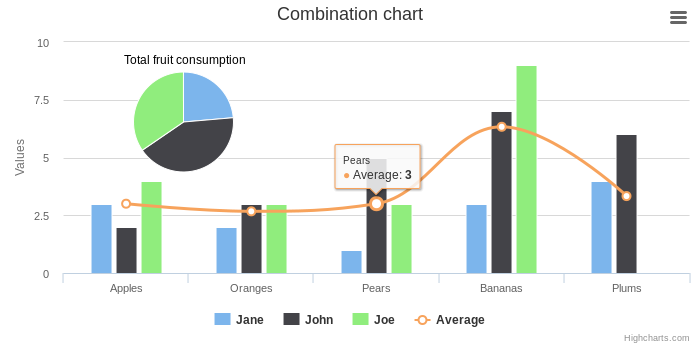
Combo Chart Like The one in the pic in the description
$this->Widget('ext.highcharts.HighchartsWidget', array(
'scripts' => array(
      'highcharts-more',   // enables supplementary chart types (gauge, arearange, columnrange, etc.)
      'modules/exporting', // adds Exporting button/menu to chart
      'themes/grid-light'        // applies global 'grid' theme to all charts
    ),
    'options' => array(
      'title' => array('text' => 'Patient Visits By Day (Last Two Weeks)'),
      'xAxis' => array(
         'categories' => array('14th','15th','16th','17th','18th','19th','20th','21th','22th','23th','24th','25th','26th','27th','28th')
      ),
      'yAxis' => array(
         'title' => array('text' => 'Number of Visits')
      ),
      'colors'=>array('#0563FE', '#6AC36A', '#FFD148', '#FF2F2F'),
      'gradient' => array('enabled'=> true),
      'credits' => array('enabled' => false),
      /*'exporting' => array('enabled' => false),*/ //to turn off exporting uncomment
      'chart' => array(
        'plotBackgroundColor' => '#ffffff',
        'plotBorderWidth' => null,
        'plotShadow' => false,
        'height' => 400,
      ),
      'title' => false,
       'series' => array(
          array('type'=>'column','name' => 'Hampton Office', 'data' => array(20, 25, 25,35, 30, 28,25, 27, 23, 24, 25, 26,27,28,33)),
          array('type'=>'spline','name' => 'Hampton Office', 'data' => array(20, 25, 25,35, 30, 28,25, 27, 23, 24, 25, 26,27,28,33)),
          array('type'=>'spline','name' => 'Richmond Office', 'data' => array(5, 7, 8,9, 7, 10,11, 12, 13,15, 17, 14,15,16,18)),
          array(
            'type'=>'pie',
            'name' => 'Richmond Office',
            'data' => array(5, 7, 8),
            'dataLabels' => array(
              'enabled' => false,
            ),
            'showInLegend'=>false,
            'size'=>'10',
            'center'=>[20, 20],
          ),
      ),
    )
  ));
Basic Column (bar graph)
$this->Widget('ext.highcharts.HighchartsWidget', array(
    'options' => array(
      'title' => array('text' => 'Patient Visits By Day (Last Two Weeks)'),
      'xAxis' => array(
         'categories' => array('14th','15th','16th','17th','18th','19th','20th','21th','22th','23th','24th','25th','26th','27th','28th')
      ),
      'yAxis' => array(
         'title' => array('text' => 'Number of Visits')
      ),
      'colors'=>array('#6AC36A', '#FFD148', '#0563FE', '#FF2F2F'),
      'gradient' => array('enabled'=> true),
      'credits' => array('enabled' => false),
      'exporting' => array('enabled' => false),
      'chart' => array(
        'plotBackgroundColor' => '#ffffff',
        'plotBorderWidth' => null,
        'plotShadow' => false,
        'height' => 400,
        'type'=>'column'
      ),
      'title' => false,
       'series' => array(
          array('name' => 'Hampton Office', 'data' => array(20, 25, 25,35, 30, 28,25, 27, 23, 24, 25, 26,27,28,33)),
          array('name' => 'Newport News Office', 'data' => array(15, 17, 14, 15, 18,21, 22, 26, 33, 28, 30, 28, 25, 36,40)),
          array('name' => 'Richmond Office', 'data' => array(5, 7, 8,9, 7, 10,11, 12, 13,15, 17, 14,15,16,18)),
          array('name' => 'Virgina Beach Office', 'data' => array(25, 27, 23, 22, 24,20, 25, 26, 30, 27, 30, 28, 25, 26,28)),

      ),
    )
  ));
Basic Line Chart
$this->Widget('ext.highcharts.HighchartsWidget', array(
   'options'=>array(
      'title' => array('text' => 'Patient Visits By Day (Last Two Weeks)'),
      'xAxis' => array(
         'categories' => array('14th','15th','16th','17th','18th','19th','20th','21th','22th','23th','24th','25th','26th','27th','28th')
      ),
      'yAxis' => array(
         'title' => array('text' => 'Number of Visits')
      ),
      'credits' => array('enabled' => false),
      'series' => array(
         array('name' => 'Hampton Office', 'data' => array(20, 25, 25,35, 30, 28,25, 27, 23, 24, 25, 26,27,28,33)),
         array('name' => 'Newport News Office', 'data' => array(15, 17, 14, 15, 18,21, 22, 26, 33, 28, 30, 28, 25, 36,40)),
         array('name' => 'Richmond Office', 'data' => array(5, 7, 8,9, 7, 10,11, 12, 13,15, 17, 14,15,16,18)),
         array('name' => 'Virgina Beach Office', 'data' => array(25, 27, 23, 22, 24,20, 25, 26, 30, 27, 30, 28, 25, 26,28)),
      )
   )
));
Basic Pie Chart
$this->Widget('ext.highcharts.HighchartsWidget', array( 'options' => array( // 'colors'=>array('#6AC36A', '#FFD148', '#0563FE', '#FF2F2F', '#000000'), 'colors'=>array('#FFD148', '#0563FE', '#FF2F2F', '#000000'), 'gradient' => array('enabled'=> true), 'credits' => array('enabled' => false), 'exporting' => array('enabled' => false), 'chart' => array( 'plotBackgroundColor' => '#ffffff', 'plotBorderWidth' => null, 'plotShadow' => false, 'height' => 400, ), 'title' => false, 'tooltip' => array( // 'pointFormat' => '{series.name}: <b>{point.percentage}%</b>', // 'percentageDecimals' => 1, 'formatter'=> 'js:function() { return this.point.name+": <b>"+Math.round(this.point.percentage)+"</b>%"; }', //the reason it didnt work before was because you need to use javascript functions to round and refrence the JSON as this.<array>.<index> ~jeffrey ), 'plotOptions' => array( 'pie' => array( 'allowPointSelect' => true, 'cursor' => 'pointer', 'dataLabels' => array( 'enabled' => true, 'color' => '#AAAAAA', 'connectorColor' => '#AAAAAA', ), 'showInLegend'=>true, ) ), 'series' => array( array( 'type' => 'pie', 'name' => 'Percentage', 'data' => array( // array('Ready / Deployable', 15), array('User Maintenance', 30), array('Manufacturer Maintenance', 40), array('Not Operation Ready', 10), array('Checked Out', 5) ), ), ), ) ));Super
Super Ji Super. your extension saved my time a lot.
Adding 3D Chart Dependencies
I added 3D chart recognition by changing highcharts/HighchartsWidget.php
Find the line that has
array_unshift($this->scripts, $this->_baseScript);Then add the following ABOVE the line.
if (isset($this->options['chart']['options3d']['enabled']))
{
    if ($this->options['chart']['options3d']['enabled']===true) {
        array_unshift($this->scripts, 'highcharts-3d');
    }
}
Does anyone have any better suggestions to do this?
Add some life function for gauge:
How can i add some life function for gauge charts.
At line 85: JSFiddle
Manual integration
Hi everyone,
If anyone wants to integrate HighCharts manually, here's a little tutorial I've written on the topic: link
Hope it's helpful!
percent
how i can use % in width ?
High Charts with Active Record
I wish to create bar graph with count of records entered per month.
I am able to get the months and the count. But from there i am stuck on how to get the data to display on the graph.
$currdate = date('d-m-Y');

	for ($i = 1; $i < 13; $i++) {
		$mon =date("m", strtotime("-$i months", strtotime($currdate)));

		$months = (int)$mon;
		$data = Records::model()->count('month(creation_date)=:id ',array(':id'=>$months));
	}
I know it's arrays but i can't point a finger; I have a working version which is not a very good implementation - it works though. See Below
<?php
	$currdate = date('d-m-Y');


	$one =date("m");
	$one_1=date("M");

	$two =date("m d y", strtotime("-1 months", strtotime($currdate)));
	$two_1 =date("M", strtotime("-1 months", strtotime($currdate)));

	$three =date("m", strtotime("-2 months", strtotime($currdate)));
	$three_1=date("M", strtotime("-2 months", strtotime($currdate)));

	$four =date("m", strtotime("-3 months", strtotime($currdate)));
	$four_1 =date("M", strtotime("-3 months", strtotime($currdate)));

	$five =date("m", strtotime("-4 months", strtotime($currdate)));
	$five_1 =date("M", strtotime("-4 months", strtotime($currdate)));

	$six =date("m", strtotime("-5 months", strtotime($currdate)));
	$six_1 =date("M", strtotime("-5 months", strtotime($currdate)));

	$seven =date("m", strtotime("-6 months", strtotime($currdate)));
	$seven_1 =date("M", strtotime("-6 months", strtotime($currdate)));

	$eight =date("m", strtotime("-7 months", strtotime($currdate)));
	$eight_1 =date("M", strtotime("-7 months", strtotime($currdate)));

	$nine =date("m", strtotime("-8 months", strtotime($currdate)));
	$nine_1 =date("M", strtotime("-8 months", strtotime($currdate)));

	$ten =date("m", strtotime("-9 months", strtotime($currdate)));
	$ten_1 =date("M", strtotime("-9 months", strtotime($currdate)));

	$eleven =date("m", strtotime("-10 months", strtotime($currdate)));
	$eleven_1 =date("M", strtotime("-10 months", strtotime($currdate)));

	$twelve =date("m", strtotime("-11 months", strtotime($currdate)));
	$twelve_1 =date("M", strtotime("-11 months", strtotime($currdate)));

	 $data_1 = Records::model()->findAll('month(creation_date)=:id ',array(':id'=>$one));
	 $data_2 = Records::model()->findAll('month(creation_date)=:id ',array(':id'=>$two));
	 $data_3 = Records::model()->findAll('month(creation_date)=:id ',array(':id'=>$three));
	 $data_4 = Records::model()->findAll('month(creation_date)=:id ',array(':id'=>$four));
	 $data_5 = Records::model()->findAll('month(creation_date)=:id ',array(':id'=>$five));
	 $data_6 = Records::model()->findAll('month(creation_date)=:id ',array(':id'=>$six));
	 $data_7 = Records::model()->findAll('month(creation_date)=:id ',array(':id'=>$seven));
	 $data_8 = Records::model()->findAll('month(creation_date)=:id ',array(':id'=>$eight));
	 $data_9 = Records::model()->findAll('month(creation_date)=:id ',array(':id'=>$nine));
	 $data_10 = Records::model()->findAll('month(creation_date)=:id ',array(':id'=>$ten));
	 $data_11 = Records::model()->findAll('month(creation_date)=:id ',array(':id'=>$eleven));
	 $data_12 = Records::model()->findAll('month(creation_date)=:id ',array(':id'=>$twelve));

	 $month = '["'.$one_1.'","'.$two_1.'","'.$three_1.'","'.$four_1.'","'.$five_1.'","'.$six_1.'","'.$seven_1.'","'.$eight_1.'","'.$nine_1.'","'.$ten_1.'","'.$eleven_1.'","'.$twelve_1.'",]';
	 $data = "[".count($data_1).",".count($data_2).",".count($data_3).",".count($data_4).",".count($data_5).",".count($data_6).",".count($data_7).",".count($data_8).",".count($data_9).",".count($data_10).",".count($data_11).",".count($data_12).",]";
?>
<script type="text/javascript">
var chart;
$(document).ready(function() {
	chart = new Highcharts.Chart({
		chart: {
			renderTo: 'container',
			type: 'column'
		},
		title: {
			text: 'Monthly Average Admissions'
		},
		subtitle: {
			/*text: 'Cource: Computer Applications'*/
		},
		xAxis: {
			categories:
				<?php echo $month; ?>

		},
		yAxis: {
			min: 0,
			title: {
				text: 'No.of Admissions'
			}
		},
		legend: {
			layout: 'none',

		},
		tooltip: {
			formatter: function() {
				return ''+
					this.x +': '+ this.y +' Admissions';
			}
		},
		plotOptions: {
			column: {
				pointPadding: 0.2,
				borderWidth: 0
			}
		},
			series: [{
			name: 'Month',
			data: <?php echo $data; ?>,
			color:'#adce5c',

		}, ]
	});
});
</script>

<div class="clear"></div>
  <div style="margin-top:20px; width:90%" id="container"></div>
This is the code i wish to make simple and efficient. thanks
Solid Gauge
Can anyone give me a working example of a solid gauge chart ?
v5.0.2 Bug Fix
To those of you that downloaded v5.0.2 and could not get the widget to display, getting a js error of
"Uncaught ReferenceError: Highcharts is not defined", here is the fix:
extensions/highcharts/HighchartsWidget.php change line 78
//from
public $scriptPosition = null;
//to
public $scriptPosition = CClientScript::POS_END;
This null value was preventing the registerScriptFile of the highcharts.js script located in the generated assets folder making it unavailable to your view.
Note I am using Yii v1.1.10
How to generate image
Hi all, I need the chart is not generated as a interactive object but as a static image.
Is it possible? Thanks
Leave a comment
If you have any questions, please ask in the forum instead.
Join the conversation to share a note.