

Introduction 
Nearly totally re-written, this extension is the new version of EGMap. I decided to include it as a new version as this one breaks backwards compatibility. I did that in order to implement a different approach, more like the Yii style.
With the new code it was also possible to do lot of code cleansing, making the classes more compact.
Now, magic getters and setters allows the use of options and functions pre-named as set or get, like properties, more or less what is happening with CComponent.
This version have (including all of the previous EGMap library):
LatLonControl
DragKeyZoom Control
MarkerWithLabel Control
Clusterer Marker Support
- KML Support (it also includes the library EGMapKMLFeed, which was created to provide an easy way to create KML documents)
TODO LIST
AJAX marker rendering features
Note: Information about previous versions of this extension are on this Forum Post
 IMPORTANT NOTICE The repository location has now changed to a better github location, so people can easily work on that extension only.Change Log 
- 19-12-2011 Added EGMapPolylineEncoder to encode polygon paths and Elevation API v3 support
- 19-12-2011 Update geolocation from V2 to V3 API by Matt Cheale
- 19-12-2011 Fixed reverse geocoding info bug
- 17-12-2011 Fixed a minor and silly bug
- 17-12-2011 Added Polygons [by Matt Kay], Rectangles and Circles support
- 16-12-2011 Fixed CURL open_basedir restriction and added marker animations
- 23-11-2011 Fixed IE 8 loading bug (thanks ghadad)
- 12-10-2011 Code improvements: Added support for InfoBox, included a Reverse Geolocation class tool with options to update form fields on center change.
- 23-03-2011 Updated Reverse GeoCoding from v2 to v3 (check Google Code SVN Repository)
- 20-03-2011 Included support for Polygons (check Google Code SVN Repository)
- 11-02-2011 Included support for language and region maps
- 11-02-2011 Included support for addDOMEventListenerOnce and addEventListenerOnce (thanks Johnatan)
- 03-02-2011 Fixed small bug on registerPlugin Function (thanks Rangel Reale)
Usage 
Unpack the contents of the zip file and place it on your protected/extensions folder. This package names EGMap library folder EGMAP, so make sure you read http://www.yiiframework.com/doc/api/1.1/YiiBase#import-detail, to understand clearly how to setup correctly the folder's extension.
Markers and Markers with Labels 
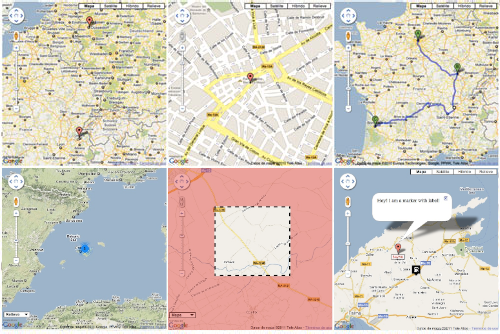
The following example shows you how you can use markers and markers with labels. It also shows how to enable a default marker clusterer
<?php
//
// ext is your protected.extensions folder
// gmaps means the subfolder name under your protected.extensions folder
//
Yii::import('ext.gmap.*');

$gMap = new EGMap();
$gMap->zoom = 10;
$mapTypeControlOptions = array(
  'position'=> EGMapControlPosition::LEFT_BOTTOM,
  'style'=>EGMap::MAPTYPECONTROL_STYLE_DROPDOWN_MENU
);

$gMap->mapTypeControlOptions= $mapTypeControlOptions;

$gMap->setCenter(39.721089311812094, 2.91165944519042);

// Create GMapInfoWindows
$info_window_a = new EGMapInfoWindow('<div>I am a marker with custom image!</div>');
$info_window_b = new EGMapInfoWindow('Hey! I am a marker with label!');

$icon = new EGMapMarkerImage("http://google-maps-icons.googlecode.com/files/gazstation.png");

$icon->setSize(32, 37);
$icon->setAnchor(16, 16.5);
$icon->setOrigin(0, 0);

// Create marker
$marker = new EGMapMarker(39.721089311812094, 2.91165944519042, array('title' => 'Marker With Custom Image','icon'=>$icon));
$marker->addHtmlInfoWindow($info_window_a);
$gMap->addMarker($marker);

// Create marker with label
$marker = new EGMapMarkerWithLabel(39.821089311812094, 2.90165944519042, array('title' => 'Marker With Label'));

$label_options = array(
  'backgroundColor'=>'yellow',
  'opacity'=>'0.75',
  'width'=>'100px',
  'color'=>'blue'
);

/*
// Two ways of setting options
// ONE WAY:
$marker_options = array(
  'labelContent'=>'$9393K',
  'labelStyle'=>$label_options,
  'draggable'=>true,
  // check the style ID
  // afterwards!!!
  'labelClass'=>'labels',
  'labelAnchor'=>new EGMapPoint(22,2),
  'raiseOnDrag'=>true
);

$marker->setOptions($marker_options);
*/

// SECOND WAY:
$marker->labelContent= '$425K';
$marker->labelStyle=$label_options;
$marker->draggable=true;
$marker->labelClass='labels';
$marker->raiseOnDrag= true;

$marker->setLabelAnchor(new EGMapPoint(22,0));

$marker->addHtmlInfoWindow($info_window_b);

$gMap->addMarker($marker);

// enabling marker clusterer just for fun
// to view it zoom-out the map
$gMap->enableMarkerClusterer(new EGMapMarkerClusterer());

$gMap->renderMap();
?>
<style type="text/css">
.labels {
   color: red;
   background-color: white;
   font-family: "Lucida Grande", "Arial", sans-serif;
   font-size: 10px;
   font-weight: bold;
   text-align: center;
   width: 40px;
   border: 2px solid black;
   white-space: nowrap;
}
</style>
KML Service 
As KML is a service that is readed from Google services, you cannot use localhost KML files, to do so, you need to specify that is localhost kml file on enableKMLService function and the geoxml3.js plugin should be automatically registered.
Yii::import('ext.gmap.*');

$gMap = new EGMap();
// using the new magic setters
// check available options per class
// objects with setMethod,getMethod and
// options array can be set now this way
$gMap->zoom = 10;
$mapTypeControlOptions = array(
   // yes we can position the controls now
   // where we want
   'position'=> EGMapControlPosition::LEFT_BOTTOM,
   'style'=>EGMap::MAPTYPECONTROL_STYLE_DROPDOWN_MENU
);

$gMap->mapTypeControlOptions= $mapTypeControlOptions;

// enabling KML Service. Second parameter of this
// function tells whether is localhost or not. GeoXML3.js
// is needed to read localhost KML files.
$gMap->enableKMLService('http://gmaps-samples.googlecode.com/svn/trunk/ggeoxml/cta.kml');

$gMap->renderMap();
Directions Example 
How to work with directions and waypoints
<?php
Yii::import('ext.gmap.*');
$gMap = new EGMap();

$gMap->setWidth(512);
// it can also be called $gMap->height = 400;
$gMap->setHeight(400);
$gMap->zoom = 8;

// set center to inca
$gMap->setCenter(39.719588117933185, 2.9087440013885635);

// my house when i was a kid
$home = new EGMapCoord(39.720991014764536, 2.911801719665541);

// my ex-school
$school = new EGMapCoord(39.719456079114956, 2.8979293346405166);

// some stops on the way
$santo_domingo = new EGMapCoord(39.72118906848983, 2.907628202438368);
$plaza_toros  = new EGMapCoord(39.71945607911511, 2.9049245357513565);
$paso_del_tren = new EGMapCoord( 39.718762871171776, 2.903637075424208 );

// Waypoint samples
$waypoints = array(
      new EGMapDirectionWayPoint($santo_domingo),
      new EGMapDirectionWayPoint($plaza_toros, false),
      new EGMapDirectionWayPoint($paso_del_tren, false)
    );

// Initialize GMapDirection
$direction = new EGMapDirection($home, $school, 'direction_sample', array('waypoints' => $waypoints));

$direction->optimizeWaypoints = true;
$direction->provideRouteAlternatives = true;

$renderer = new EGMapDirectionRenderer();
$renderer->draggable = true;
$renderer->panel = "direction_pane";
$renderer->setPolylineOptions(array('strokeColor'=>'#FFAA00'));

$direction->setRenderer($renderer);

$gMap->addDirection($direction);

$gMap->renderMap();
?>
<div id="direction_pane"></div>
KeyDragZoom Example 
How to make use of the KeyDragZoom plugin. When you use the following example, check the small magnifying glass under the zoom control or press the Shift Key to enable the Key Drag Zoom.
Yii::import('ext.gmap.*');

$gMap = new EGMap();
$gMap->zoom = 8;
// set center to inca
$gMap->setCenter(39.719588117933185, 2.9087440013885635);
$gMap->width = 400;
$gMap->height = 400;
// Enable Key Drag Zoom
$zoom_options = array(
  'visualEnabled'=>true,
  'boxStyle'=>array(
   'border'=>'4px dashed black', // strings with double quoted inside!
   'backgroundColor'=>'transparent',
   'opacity'=>1.0
  ),
  'veilStyle'=>array(
    'backgroundColor'=>'red',
    'opacity'=>0.35,
    'cursor'=>'crosshair'
  ));

$drag_Zoom = new EGMapKeyDragZoom($zoom_options);

$gMap->enableKeyDragZoom($drag_Zoom);

$gMap->renderMap();
A More Advanced Example 
Where $map is model of database table to save coordinates of a marker point. Example provided by Johnatan
ii::import('ext.gmap.*');
$gMap = new EGMap();
$gMap->setWidth(880);
$gMap->setHeight(550);
$gMap->zoom = 6;
$mapTypeControlOptions = array(
  'position' => EGMapControlPosition::RIGHT_TOP,
  'style' => EGMap::MAPTYPECONTROL_STYLE_HORIZONTAL_BAR
);

$gMap->mapTypeId = EGMap::TYPE_ROADMAP;
$gMap->mapTypeControlOptions = $mapTypeControlOptions;

// Preparing InfoWindow with information about our marker.
$info_window_a = new EGMapInfoWindow("<div class='gmaps-label' style='color: #000;'>Hi! I'm your marker!</div>");

// Setting up an icon for marker.
$icon = new EGMapMarkerImage("http://google-maps-icons.googlecode.com/files/car.png");

$icon->setSize(32, 37);
$icon->setAnchor(16, 16.5);
$icon->setOrigin(0, 0);

// Saving coordinates after user dragged our marker.
$dragevent = new EGMapEvent('dragend', "function (event) { $.ajax({
                                            'type':'POST',
                                            'url':'".$this->createUrl('catalog/savecoords').'/'.$items->id."',
                                            'data':({'lat': event.latLng.lat(), 'lng': event.latLng.lng()}),
                                            'cache':false,
                                        });}", false, EGMapEvent::TYPE_EVENT_DEFAULT);

// If we have already created marker - show it
if ($map) {

    $marker = new EGMapMarker($map->lat, $map->lng, array('title' => Yii::t('catalog', $items->type->name),
            'icon'=>$icon, 'draggable'=>true), 'marker', array('dragevent'=>$dragevent));
    $marker->addHtmlInfoWindow($info_window_a);
    $gMap->addMarker($marker);
    $gMap->setCenter($map->lat, $map->lng);
    $gMap->zoom = 16;

// If we don't have marker in database - make sure user can create one
} else {
    $gMap->setCenter(38.348850, -0.477551);

    // Setting up new event for user click on map, so marker will be created on place and respectful event added.
    $gMap->addEvent(new EGMapEvent('click',
            'function (event) {var marker = new google.maps.Marker({position: event.latLng, map: '.$gMap->getJsName().
            ', draggable: true, icon: '.$icon->toJs().'}); '.$gMap->getJsName().
            '.setCenter(event.latLng); var dragevent = '.$dragevent->toJs('marker').
            '; $.ajax({'.
              '"type":"POST",'.
              '"url":"'.$this->createUrl('catalog/savecoords')."/".$items->id.'",'.
              '"data":({"lat": event.latLng.lat(), "lng": event.latLng.lng()}),'.
              '"cache":false,'.
            '}); }', false, EGMapEvent::TYPE_EVENT_DEFAULT_ONCE));
}
$gMap->renderMap(array(), Yii::app()->language);
InfoBox Example 
InfoBox is a cool plugin that allows you to modify the info windows of your map.
Yii::import('site.common.components.egmap.*');

$gMap = new EGMap();
$gMap->setJsName('test_map');
$gMap->width = '100%';
$gMap->height = 300;
$gMap->zoom = 8;
$gMap->setCenter(39.737827146489174, 3.2830574338912477);

$info_box = new EGMapInfoBox('<div style="color:#fff;border: 1px solid black; margin-top: 8px; background: #000; padding: 5px;">I am a marker with info box!</div>');

// set the properties
$info_box->pixelOffset = new EGMapSize('0','-140');
$info_box->maxWidth = 0;
$info_box->boxStyle = array(
	'width'=>'"280px"',
	'height'=>'"120px"',
	'background'=>'"url(http://google-maps-utility-library-v3.googlecode.com/svn/tags/infobox/1.1.9/examples/tipbox.gif) no-repeat"'
);
$info_box->closeBoxMargin = '"10px 2px 2px 2px"';
$info_box->infoBoxClearance = new EGMapSize(1,1);
$info_box->enableEventPropagation ='"floatPane"';

// with the second info box, we don't need to
// set its properties as we are sharing a global
// info_box
$info_box2 = new EGMapInfoBox('<div style="color:#000;border: 1px solid #c0c0c0; margin-top: 8px; background: #c0c0c0; padding: 5px;">I am a marker with info box 2!</div>');
// Create marker
$marker = new EGMapMarker(39.721089311812094, 2.91165944519042, array('title' => 'Marker With Info Box'));
// add two
$marker2 = new EGMapMarker(39.721089311812094, 2.81165944519042, array('title' => 'Marker With Info Box 2'));
$marker->addHtmlInfoBox($info_box);
$marker2->addHtmlInfoBox($info_box2);

$gMap->addMarker($marker);
$gMap->addMarker($marker2);

$gMap->renderMap();
Rectangle Example [*New*] 
Yii::import('site.common.components.egmap.*');

$gMap = new EGMap();
$gMap->setJsName('test_map');
$gMap->width = '100%';
$gMap->height = 300;
$gMap->zoom = 4;
$gMap->setCenter(25.774252, -80.190262);

$bounds = new EGMapBounds(new EGMapCoord(25.774252, -80.190262),new EGMapCoord(32.321384, -64.75737) );
$rec = new EGMapRectangle($bounds);
$rec->addHtmlInfoWindow(new EGMapInfoWindow('Hey! I am a rectangle!'));

$gMap->addRectangle($rec);

$gMap->renderMap();
Circle Example [*New*] 
Yii::import('site.common.components.egmap.*');

$gMap = new EGMap();
$gMap->setJsName('test_map');
$gMap->width = '100%';
$gMap->height = 300;
$gMap->zoom = 4;
$gMap->setCenter(34.04924594193164, -118.24104309082031);


$circle = new EGMapCircle(new EGMapCoord(34.04924594193164, -118.24104309082031));
$circle->radius = 300000;
$circle->addHtmlInfoWindow(new EGMapInfoWindow('Hey! I am a circle!'));
$gMap->addCircle($circle);

$gMap->renderMap();
Polygon Example [*New*] 
Yii::import('site.common.components.egmap.*');

$gMap = new EGMap();
$gMap->setJsName('test_map');
$gMap->width = '100%';
$gMap->height = 300;
$gMap->zoom = 4;
$gMap->setCenter(25.774252, -80.190262);

$coords = array(
       new EGMapCoord(25.774252, -80.190262),
       new EGMapCoord(18.466465, -66.118292),
       new EGMapCoord(32.321384, -64.75737),
       new EGMapCoord(25.774252, -80.190262)
);

$polygon = new EGMapPolygon($coords);
$polygon->addHtmlInfoWindow(new EGMapInfoWindow('Hey! I am a polygon!'));
$gMap->addPolygon($polygon);

$gMap->renderMap();
Reverse Geocode Example [*New*] 
Yii::import('site.common.components.egmap.*');

$gMap = new EGMap();
$gMap->setWidth(500);
$gMap->setHeight(400);
$gMap->zoom = 5;

$sample_address = 'Czech Republic, Prague, Olivova';

// Create geocoded address
$geocoded_address = new EGMapGeocodedAddress($sample_address);
$geocoded_address->geocode($gMap->getGMapClient());

// Center the map on geocoded address
 $gMap->setCenter($geocoded_address->getLat(), $geocoded_address->getLng());

// Add marker on geocoded address
$gMap->addMarker(
     new EGMapMarker($geocoded_address->getLat(), $geocoded_address->getLng())
);

$gMap->renderMap();
Elevation Example [*New*] 
$e = new EGMapElevationInfo(
     array('25.774252, -80.190262',
           '18.466465, -66.118292',
            new EGMapCoord(32.321384, -64.75737), /* we can also use EGMapCoord */
            new EGMapCoord(25.774252, -80.190262)));

$e->elevationRequestJson(new EGMapClient());
$loc =  $e->getLocations();

foreach($loc as $l)
{
	echo $l->lat.'<br/>';
	echo $l->lng.'<br/>';
	echo $l->resolution.'<br/>';
	echo $l->elevation.'<br/>';
	echo '--------------<br/>';
}
Follow 
Be up-to-date with this extension on my blog. I will write demos and explain its total functionality there in order not to make this article too long.
I love what I do, if you appreciate my work I accept donations at Gittip
Resources 
- GitHub repository
- Google Code SVN Repository -deprecated!
- Google Maps V3 Reference
- Project Page
- Forum Post
- Reference to Previous versions
- 2amigOS Packagist Profile

web development has never been so fun
www.2amigos.us
 Antonio Ramirez
User Contributed Notes 76
Wrong location given coordinates.
Hi, Antonio. Thank you for this wonderful extension.
I tried with this snippet of code to show Venezuela. The coordinates were taken from the link below:
http://maps.google.com/maps?f=q&source=s_q&hl=de&geocode=&q=venezuela&aq=&sll=6.42375,-66.58973&sspn=21.36297,43.286133&ie=UTF8&hq=&hnear=Venezuela&z=5
$gMap = new EGMap();
$gMap->setWidth(588);
$gMap->setHeight(345);
$gMap->zoom = 5;
$gMap->mapTypeControlOptions = array(
'position'=> EGMapControlPosition::RIGHT_TOP,							'style'=>EGMap::MAPTYPECONTROL_STYLE_DROPDOWN_MENU
);
$gMap->setCenter(6.402648, -66.665039);
$gMap->renderMap();
?>
It seems that everything is Ok with it. However, when I run this I end up near Marshall Islands and Micronesia. (I asked myself if I had to turn left in Albuquerque, like Bugs Bunny did more than once). Seems like the Latitude coordinate its fine, but something happened to Longitude.
I also noticed that all your examples are using positive coordinates so, I wonder if I'm doing something wrong or is there something I didn't read. Maybe it's a bug. Dunno.
@bigchirv
When i put you example on my computer, I see wonderful Venezuela...
Weird thing.
Incredible. Then I'm going to do some assets cleanup to see if that's the problem because with that code I end up in the middle of the Pacific Ocean. :)
I'll let you know my findings. Thank you for the quick answer.
I think I've found Narnia :)
Hello, Antonio.
I'm afraid I have to insist about the issue I commented below. This very piece chunk of code still drops me in the middle of the Pacific.
Also, the code was tested in servers at Venezuela and USA, both with the same results. Both servers are running Ubuntu Server 10.04. LC_* in both servers are in VET and clocks are un UTC (Don't know if that affects in any way).
I'm going to read your code to understand what it does and find any thing that could help me to solve the issue. In the meantime if you come up with something I'll appreciate you dropping a couple of lines.
Once again thanks for the extension.
Narnia, and the bug. Two in a row.
In JS generated code I found this (dixit):
jQuery(window).load(function() {
function EGMapContainer1_init(){
var mapOptions = {center:new google.maps.LatLng(6,42375, -66,38973),
zoom:5,
mapTypeId:google.maps.MapTypeId.ROADMAP,
mapTypeControlOptions:{position:google.maps.ControlPosition.RIGHT_TOP,
style:google.maps.MapTypeControlStyle.DROPDOWN_MENU}};

EGMap0 = new google.maps.Map(document.getElementById("EGMapContainer1"), mapOptions);


			  }
EGMapContainer1_init();
Notice the declaration of 'center' in mapOptions. When giving coordinates, the system generates the coordinates using a semicolon instead of a dot as the decimals separator.
I tested it changing semicolons for dots in the Javascript console of my browser. And re-running the function. Worked like a charm.
Since the page locale is set to 'esVE.UTF-8' (hardcoded in it) I think that the problem could be there with PHP and all the LC* stuff.
Let me know what you think.
@bigchirv
That is a good point! You found the point why Narnia was on the map instead of Venezuela :)
The dots and the commas are something didn't think about and you are very right about the LOCALE settings. The only solution I think of is that you set the center as a numeric float string:
$gMap = new EGMap();
$gMap->setWidth(588);
$gMap->setHeight(345);
$gMap->zoom = 5;
$gMap->mapTypeControlOptions = array(
'position'=> EGMapControlPosition::RIGHT_TOP,                           'style'=>EGMap::MAPTYPECONTROL_STYLE_DROPDOWN_MENU
);
$gMap->setCenter('6.402648', '-66.665039');
$gMap->renderMap();
The rendering should work as the server will hold the string representation of the float values until is rendered on Javascript code.
Thank you very much for pointing that out. If surrounding the float numbers with single quotes work I will update the Wiki with your observation.
Thank you very much again bigchirv.
My solution
Unfortunately, what you pointed about passing the coordinates as a string didn't work either. So, the simpler, not-elegant-at-all KISS solution I found was pretty straighforward. I just changed the locale to 'en_US.UTF-8' before the widget lines and restored it to 'es_VE.UTF-8' after the widget execution. The new code is:
<?php setlocale(LC_ALL, 'en_US.UTF-8'); ?>
<?php
$gMap = new EGMap();
$gMap->setWidth(588);
$gMap->setHeight(345);
$gMap->zoom = 5;
$gMap->mapTypeControlOptions =  array('position'=>EGMapControlPosition::RIGHT_TOP,'style'=>EGMap::MAPTYPECONTROL_STYLE_DROPDOWN_MENU);
$gMap->setCenter(6.42375,-66.38973);
$gMap->renderMap();
?>
<?php setlocale(LC_ALL, 'es_VE.UTF-8'); ?>
If there is no other solution out there IMHO you should set the locale to 'en_US' or 'C' in the widget class.
Thank you Antonio!
@bigchirv
IMHO, I don't think is a good idea to actually change the locale of the user from the widget. I rather let that option to the extension user.
Is really good that you have found the problem and all users will be able to workaround the problem thanks to your efforts.
Thanks again @bigchirv
ClearMarkers()
Hi! I need the function available in googlemaps API in MarkererClusterer called ClearMarkers() with this function and SetMarkers() is possible reload the markers with Ajax Function, but i don't know how i must change the extension in order to support this function that it's already present in googlemaps.
Thanks!
If you give me this information, I don't have any problem to post my ajax code to do the markers reload but without that function, I wasn't able to do it.
find a bug
When I want to change the makerClusterer image, the js lost qoutation, function toJs() may change to
$return = 'var '.$this->getJsName().'= new MarkerClusterer('.$map_js_name.','.EGMap::encode($markers).',"'.EGMap::encode($this->options).'");';But when set the imagesPath, the marker still not changed.
$gMapMarkerClusterer=new EGMapMarkerClusterer( array('imagesPath'=>'http://google-maps-icons.googlecode.com/files/cityhall-admin.png'));mouse wheel
Is there a way to disable mouse wheel?
Thanks
Address to coordinates
Everybody: i have an user address and i want to display a map in the view.php with the map centered on user's house (having his address in my DB). How can i do it?
@bitshine
There was a bug yes: "imagesPath", didn't belong to EGMapClusterer options. If you wish to change clusterer marker images, you have to set its style attribute as explained on the following link:
http://gmaps-utility-library-dev.googlecode.com/svn/tags/markerclusterer/1.0/docs/reference.html#MarkerClustererOptions
PS: The GitHub has been updated with the bug fix, thanks bitshine.
@qinsanep
Hi qinsanep,
Thank you very much for pointing that out. I shouldn't assume that everybody knows what import means and inform everybody how to correctly set the folder.
Nevertheless, I would recommend you to use another language to express your self on this site. People may find it disrespectful, and a lot of them, do give away lots of their time to help others improve their Yii applications.
Thanks again
Re: usage example documentation
@qinsanep
>NOTE: Please pay attention on your language and please do not complain or insult authors that give away their time and code from which other users can learn!
First of all as you alone acknowledge that you are a noob, didn't maybe you get the idea that it's not working because of wrong usage or something similar.
But even if that was an error... don't you think it would be better to just notify the author so he can fix it.
@tonydspaniard
Hi,
I apologize for my impatient behavior. I just spent a long time trying to figure out why this extension was not running. I trusted that the documentation was up to date, but sometimes little details are missed.
I greatly appreciate everything that authors such as yourself have put into the Yii project and I will one day in turn, give back as well. I thank you for your help and understanding! Cheers!
reposition marker
Hi, Antonio
Tell me please - how make 'REPOSITION' marker, with your extention.
Advance thanks.
@mastercz
Hi Mastercz,
What do you meant about REPOSITION marker. Could you please explain that at the 'forum'?
Issue with marker
Hi there
I loved this awesome plugin and used in my each website.
Now Strange thing have appeared in my existing web implementation. That all of sudden there a box has started to appear where marker is placed. More over I found out if you set draggable => true this box vanishes.
I am attaching the code and Image .Hope it Helps.If it gets resolved please tell me :)
<div style="margin-left: 60px; float: left;">
<?php
        Yii::import('application.extensions.gmap.*');
        $gMap = new EGMap();
        $gMap->zoom = 13;
        $gMap->setWidth(750);
        $gMap->setHeight(500);
        $mapTypeControlOptions = array(
            'position'=> EGMapControlPosition::RIGHT_TOP,
            'style'=>EGMap::MAPTYPECONTROL_STYLE_DROPDOWN_MENU
                );
        $zoom_options = array(
            'visualEnabled'=>true,
            'boxStyle'=>array(
                'border'=>'4px dashed black', // strings with double quoted inside!
                'backgroundColor'=>'transparent',
                'opacity'=>1.0
             ),
            'veilStyle'=>array(
                'backgroundColor'=>'red',
                'opacity'=>0.35,
                'cursor'=>'crosshair'
                ));
        $drag_Zoom = new EGMapKeyDragZoom($zoom_options);

        $gMap->enableKeyDragZoom($drag_Zoom);
        $gMap->mapTypeControlOptions= $mapTypeControlOptions;
        $gMap->setCenter(31.530262976084487,74.32323932647796);

        foreach($model as $hotel)
        {
             $stars='';
            for($str=0 ; $str < $hotel->hotel_rating ; $str++)
            {
                 $stars =  $stars.CHtml::image(Yii::app()->baseUrl.'/images/StarRate.png',
                         'Delete', array('class' => 'ratingStar'));
            };
            // Create GMapInfoWindows
            $info_window_a = new EGMapInfoWindow('<h1><strong>'.
                    CHtml::link($hotel->name,array('hotel/view','id'=>$hotel->id,'type'=>'raw'), array('target'=>'_blank'))
                    .'</strong></h1> <span style="float:right;">'.$stars.'</span>'.$hotel->address.'');

            $icon = new EGMapMarkerImage(Yii::app()->baseUrl.'/images/hotelSymbol.png');

            $icon->setSize(32, 37);
            $icon->setAnchor(16, 16.5);
            $icon->setOrigin(0, 0);

            // Create marker
            $marker = new EGMapMarker($hotel->lat,$hotel->long, array('title' => $hotel->name,'icon'=>$icon));
            $marker->addHtmlInfoWindow($info_window_a);


            $gMap->addMarker($marker);

        }
        $gMap->renderMap();
                ?>
</div>
NO THEY ARE NOT SOME GOOGLE RESTRICTED AREAS WHERE EVER MARKER IS THEY APPEAR BEHIND ICON.
ICON IS SMALL AS SEEN IN IMAGE
@afnan
For what I see, is that for some reason the layer behind the icon doesn't download/show. Please, try the following:
// totally untested -- $gMap->renderMap(array('google.maps.event.trigger('.$gMap->getJsName().', "resize");');@tonydspaniard
1.It does not help if i donot use that marker or other i tried with
$icon = new EGMapMarkerImage("http://google-maps-cons.googlecode.com/files/gazstation.png");2.Using
$gMap->renderMap(array('google.maps.event.trigger('.$gMap->getJsName().', "resize");'));also did not helped
**Note: it was working few days ago perfectly. No issues there.
If I use some of your sample codes given above same happens with them**
may be google has changed something?
Issue with marker [Solved]
I posted the bug earlier.
I solved it actually it is not extension. Infact this is the most wonderful extension with great document and working samples that I have come across.
Issue was in css/style.css I by mistake wrote a code that eventually effected this extension
EGMap inside JuiDialog
Hi I am using this gmap and make it appear on a Jui Dialog but the problem is the map is not displaying completely.. only a part of it.. any idea what's the problem?
thanks
@butching
Solution on: http://www.yiiframework.com/forum/index.php?/topic/14445-egmap-20-google-maps-extension/pageviewfindpostp136891 ( as you already know ;) )
Map as Image
Hi,
this may sound a little bit strange, but what I need for my project, is a static image (without) any zoom, ... etc. functions (but pls. with markers, polygons,..inside).
Is their a method I can use to just grep this image and send it back to the browser as MIME image/jpeg???
This would be great!
Cheers Philipp
@philippfrenzel
Check at the code... you have the getStaticMapUrl for that purpose (line 1114 EGMap class)
public function getStaticMapUrl($maptype='mobile', $hl='es') { $params = array( 'maptype' => $maptype, 'zoom' => $this->zoom, /* deprecated */ /*'key' => $this->getAPIKey(),*/ 'center' => $this->getCenterLat() . ',' . $this->getCenterLng(), 'size' => $this->getWidth() . 'x' . $this->getHeight(), 'hl' => $hl, 'markers' => $this->getMarkersStatic(), 'sensor' => 'false' ); $pairs = array(); $params = http_build_query($params); return 'http://maps.googleapis.com/maps/api/staticmap?' . $params; }Static Map and Polygon
Hi,
I tried to use the staticMapUrl -> but it "only" brings back the map without any e.g. polygon...
I checked out google api's and they have a static map API returning the map with included objects - do egmap support it already or will it? I love your extension and I ask you for all the stuff, as I need it...;)
Cheers Philipp
http://maps.google.com/staticmap?maptype=mobile&zoom=11¢er=48.2002,16.3506&size=512x512&hl=en&markers=
Additional API from Google:
Google Maps Static API
@philippfrenzel
I will add support to all objects as soon as i have bit of time.
Support on Submit Click
Hi
I am very happy with this extension. I wonder if I am missing or this extension does not have feature to register place other than specifying AJAX calls.
I mean is if you have form and you add a small map and allow user to select place and fill other form. Once everything is done he clicks submit and then long and lat values go to database. If anyone has done this please help me. Thanks
Hi every one I am trying this but it can't work form
I want to point out multiple marker that comes from database. Like this the exact I want
http://www.realestate.com.au/buy/in-ayers rock; barunga; atitjere/map-1 but I can't get it.
I any one done this before with multiple marker or not.
Help me out.
Stopped working
Not sure if this is happening to any one else, but my maps stopped working, they just point into the middle of the ocean, it used to work just right before, and works on my local host. Any idea whats wrong?
Found that it keeps setting
var mapOptions = {center:new google.maps.LatLng(0, 0)to 0,0 no matter what.
Why does it do this on my online server yet on localhost it works just right?
How to Set the Zoom for Markers?
Great module!! I need to adjust the zoom so that markers are plotted by city, rather than physical address. Both fields are saved in the model and database. How do I modify this?
Hi I am using this in realstate project
Hi I am using this in realestate project. the marker as created dynamically, I actually want to set the center for the all markers, i,e the center i must create would be the center of all marker how can i achieve this or not possible, further more can i get data in any object or in array of near by places with this extension example if i had places like a,b,c,d,e,f,g so if i want to get place near by c than can this extension could have some function or method to return b and d places,
U had make great extension i appreciate for you work, i think you more about near place api of google map.
Thank waiting for your response.
Salut, Antonio Ramirez
I would know how can I use your extension with extention minScript . I get
ReferenceError: google is not defined
[Stopper sur une erreur]

} google.maps.event.addDomListener(window, "load",
in my FireBug. help please
hi to use this map in view just like list view
I am trying to implements the google map on the clist view but its not working.
Pleas suggest me any good example how to implement it.
with geolocation
I have the $gMap variable.How can i set the current position with the javascript method of geolocation watchPosition???
google is not defined....
Hi antonio, thanks for this ext, I'm using "Yii 1.1.13" and for import extension I write:
Yii::import('application.extensions.EGMap.*');instead of
Yii::import('ext.gmap.*');then after $gMap->renderMap(); function firefox return me this error:
(note: modal window & renderPartial)
thanks
@all
Please, use the forum to get support... I do my best to answer asap
Infowindow closeclick event
Hey Guys,
i am trying to add the event listener "closeclick" to the infowindow, but it is not working.
$info_window = new EGMapInfoWindow($info);
$info_window->addEvent(new EGMapEvent('closeclick', 'jQuery(function($) {$(".Box_active").removeClass("Box_active");});'));
Does anybody know what i am doing wrong?
Best regards!
How can i use direction api in this extension
Hi i want to use the get direction api in this extension so how can i achieve this.
fix
in EGMapInfoBox.php
78 'closeBoxUrl'=>null,need replace with:
78 'closeBoxURL'=>null,And for custom closebox ico should use:
... $info_box->closeBoxURL = '" your url here... "'; ...A little correcting
Hi Antonio
for EGMap.v.2.9.zip version all examples needs Yii::import('ext.egmap.') instead of Yii::import('ext.gmap.')
Also I gave you vote,
excellent work for this extension :)
Problem with left-side control box
Hello, I've tried "A More Advanced Example" in my website, and I see the left-side controls this way:
Any ideas?
Solved!
It was a problem with bootstrap.css.
Another question: Reverse geocode is not working, or?
Just FYI to use % instead of px
in EGmap.php
lines 1086
$width = $width . 'px';and 1100
$height = $height . 'px';you can take out the .'px' completely or change it to %.
note if you take it out you will need to type in px or % in your view
i.e.
$gMap->setWidth(100%); $gMap->setHeight(400px);Bootstrap fix
For those interested, the bootstrap menu fix is:
wrap your map in a div with an id of map_canvas.
Port for yii2?
Hi,
are you working on a port for yii2? I would like to use it in my development project;)?
Regards Phil
Tutorial with egMap and Zillow Neighborhood Boundary Maps for U.S.
I’ve built a free, open source demo application, MapApp, to demonstrate how to use the Zillow neighborhood boundaries and integrate them with Google Maps, geolocation and geocoding.
MapApp is built using the Yii Framework and can be run on any MySQL/PHP-capable server. MapApp also leverages Google Maps API, HTML5 Geolocation helper from estebanav, eGeocoder and egMap (the latter two are Yii extensions).
How to Use Zillow Neighborhood Maps and HTML5 Geolocation
Error on centerAndZoomOnMarkers()
Hi Antonio,
I have some problem with $gMap->centerAndZoomOnMarkers(): grey box and no map.
All is ok when i set in EGMapBounds->getZoom
$infinity=nullBy and thx for this great extension.
how to get marker latitude and longitude after user marked his/her place
Hi, I integrated map successfully but i don't know how to get latitude and longitude after once user used it to save in database. help me out thanks in advance
Multiple kml file
Is it possible to render multiple kml file? How to do so? I've tried but only the last file rendered. Thanks in advanced. sorry for my english. Great extension. (y)
Change Direction Icon
Hi
How do I change the Icons when using Directions ?
Please please help me
I am trying to show the multple marker on the map
I am trying to show multiple maker with different info window in am single map. I had used the below it worked previously than it stopped working.
In my local its working but in live its not working did any one faced this problem before did any body knows what exactly had happened to my coode
<?php Yii::import('ext.EGMap.*'); $gMap = new EGMap(); $i = 1; foreach ($data as $dat): $property = Property::model()->findByPk($dat['property_id']); $propertyaddress = Propertyaddress::model()->findByAttributes(array('property_id'=>$dat['property_id'])); $state = $propertyaddress->state; $city = $propertyaddress->suburb; $addr = $propertyaddress->streetnumber.','.$propertyaddress->street.','.$city.','.$state.','.$propertyaddress->postcode; $gMap1 = new EGMap(); $sample_address = $addr; $geocoded_address = new EGMapGeocodedAddress($sample_address); $geocoded_address->geocode($gMap->getGMapClient()); $lat = $geocoded_address->getLat(); $long = $geocoded_address->getLng(); $gMap->setJsName('test'); $gMap->width = '100%'; $gMap->height = 400; $gMap->zoom = 8; //if($i=='1') //$gMap->setCenter($lat, $long); $region = Region::model()->findByPk($property->region_id); /* $latlong = $gMap->geocodeXml($state); //$latlong = Main::getLatLong($addr, $city, $state); print_r($latlong); exit; */ $title = '<div class="map-bg"> <div class="map-content"> <div class="map-left-desc"> <span class="map-left-desc-title">'.$property->title.','.$region->name.' '.$region->state->name.'</span> <span class="map-left-desc-type">'.PropertyType::model()->findByPk($property->ptype_id)->property_type.' $ '.$property->price.'</span> <span class="bed bed-map">'.$property->bedroom.'</span> <span class="bathroom">'.$property->bathroom.'</span> <span class="carpark">'.$property->carspaces.'</span> <p>'.CleanHtml($property->description,50).'</p> </div> <div class="map-right"> <img src="'.Yii::app()->baseUrl.'/admin/images/property/thumbs/'.$property->image.'" height="60" width="90" class="small-map-image">" <div class="map-buttons"> <input type="submit" value="Save" class="map-save-btn"/> <input type="submit" value="View Detail" class="map-dtl-btn"/> </div> </div> </div> <img src="'.Yii::app()->baseUrl.'/images/LocationDetail_agentprof_img.jpg" class="map-officiallogo" /> </div> '; $info_box = new EGMapInfoBox('<div>'.$title.'</div>'); // set the properties $info_box->pixelOffset = new EGMapSize('-150','-220'); $info_box->maxWidth = 0; $info_box->boxStyle = array( /* 'width'=>'"280px"', 'height'=>'"120px"', */ //'background'=>'"url('.Yii::app()->baseUrl.'/images/map-arrow.gif'.') no-repeat"' ); $info_box->closeBoxMargin = '"15px 2px 2px 2px"'; $info_box->infoBoxClearance = new EGMapSize(1,1); $info_box->enableEventPropagation ='"floatPane"'; // with the second info box, we don't need to // set its properties as we are sharing a global // info_box // Create marker $marker = new EGMapMarker($lat, $long,array('title'=>$property->title)); $marker->addHtmlInfoBox($info_box); $gMap->addMarker($marker); $i++; endforeach; $gMap->renderMap();?>Urgent - Updating and adding new markers using ajax
Can someone tell me in short if adding new markers dynamically is possible using this extension in conjunction with ajax?
If not, I can extend this module while working on it.
@dacoder
Either I don't understand, what you want to achieve, or your question violates basics of Yii. Yii is a backend (server-side) framework and along with all its extensions has absolutely nothing to do with frontend (client-side), where you would manipulate something using AJAX.
So direct answer is, that you can't use
egmapto add any markers dynamically, using AJAX.Please, bring more details? Maybe you just want to use this extension (at server-side) to generate strings (returned via AJAX), that are compatible with GoogleMaps API, which you could inject directly (at client-side) to your GM object. Am I right?
Well, I think, that something like that should be possible. But here comes another problem. Antonio has dropped this extension entirely and does not bring any support for it, so it is pretty much possible, that it is already not compatible with newest GooleMaps API or soon become not compatible, as GM API evolves very quickly and this extension hasn't been updated for past ten months.
I am here to help if needed.
contact me on eruaan@gmail.com
@Trejder
It is the former, manipulating ajax on the server would be a silly think to do obviously.
This will also create problems doing a render on just the markers and infowindows due to scope issues.
Might redo this extension, giving it a few hours for the answers to roll in.
Added Going through the updated features on maps api and from what I see in the extension, it surely can do with an update right now, many key events are missing.
plugin updated with ajax render functionality
I have almost completed updating the plugin with some new features and a custom function to render markers dynamically with ajax on window, drag or zoom. Contact me at ron1703@gmail.com incase anyone needs help or code snippets concerning the same.
@dacoder
Would you consider to share your solution as either separate or updated extension?
Customizing map loading process
How about enabling some customization on how and what triggers the map to be rendered
In class EGMap line 545 we see the render triggering process.
google.maps.event.addDomListener(window, "load",' . PHP_EOL . $this->_containerId . '_init);' . PHP_EOL;What if the DOM object (in this case window) and the event (load) could be overriden ?
@Victor Silver
egmap is no longer supported, AFAIK. So, you would have to do fork and introduce these changes yourself, in your own version.
Problem left-side control
Add this in CSS where .gmap is the class of the map div
Drawing Straight Lines
I'm trying to figure out how to draw straight lines between co-ordinates but cant seem to get anywhere.
Any hints or examples on how to draw polylines would be really helpful.
Why a just 10 point i can add on map directions
A problem. I can add to the map just 10 points. If i add more than 10 points of the card simply does not appear in the browser. Gray box.
How to overcome this limitation?
Thank you.
@Simbioziz
I dont really understand your issue. Do you guys mind to use the forum to show your issues (with code included) and send the link on my Forum's profile?
Thanks!
Problem with map
Iam add post in forum. Please Problems With Route Directions Egmap...
Not showing on live server?
It is working fine on localhost but when it's live it doesn't show anything. it only shows the map div and EGMapContainer1 nothing else. Anyone know of a resolution?
<?php Yii::import('application.extensions.EGMap.*'); // Create GMapInfoWindows $iconimg = Yii::app()->theme->baseUrl.'/assets/img/mapicon.png'; $icon = new EGMapMarkerImage($iconimg); $icon->setSize(32, 37); $icon->setAnchor(16, 16.5); $icon->setOrigin(0, 0); $gMap = new EGMap(); $gMap->setWidth('100%'); $gMap->setHeight(400); $gMap->zoom = 14; $info_box = new EGMapInfoBox('<div style="color:#000;border: 1px solid black; font-size: 16px; line-height: 16px; text-align:center; background: #f8f8f8; margin-top: 5px; padding: 5px;"> <img src="'.Yii::app()->theme->baseUrl.'/assets/img/logo.png'.'"></img><br>'.Yii::app()->params['address'].', <br>'. Yii::app()->params['city'].', '.Yii::app()->params['state'].' '.Yii::app()->params['zip'].'</div>'); $info_box->pixelOffset = new EGMapSize('-120','-120'); $info_box->maxWidth = 0; $info_box->boxStyle = array( 'width'=>'"232px"', 'height'=>'"160px"', ); $info_box->closeBoxMargin = '"10px 4px 4px 4px"'; $info_box->infoBoxClearance = new EGMapSize(1,1); $info_box->enableEventPropagation ='"floatPane"'; $listing_address = Yii::app()->params['address'].', '. Yii::app()->params['city'].', '.Yii::app()->params['state'].' '.Yii::app()->params['zip']; // Create geocoded address $geocoded_address = new EGMapGeocodedAddress($listing_address); $geocoded_address->geocode($gMap->getGMapClient()); // Center the map on geocoded address $gMap->setCenter($geocoded_address->getLat(), $geocoded_address->getLng()); // Add marker on geocoded address $marker = new EGMapMarker($geocoded_address->getLat(), $geocoded_address->getLng(), array('title' =>Yii::app()->params['company'].' - '.Yii::app()->params['tagline'], 'icon'=>$icon)); $marker->addHtmlInfoBox($info_box); $gMap->addMarker($marker); $gMap->renderMap(); ?>exportar a pdf
buenas tardes! quiero saber si se puede exportar a pdf el mapa, o si alguien sabe como hacerlo, desde ya muchas gracas!
@carpin
Prueba canvas2html o utiliza el método estático de Google para tener una imagen de tu mapa e insertalo en un pdf u otras librerias.
Try canvas2html o use the static method of Google to get an image of the map and insert it into a pdf by using ePdf or other libraries around.
@skworden
Did you get your API key?
html5 self-location
Hello
Is there a way to get user own location on mobile device website using this extension?
Keep up the good work
cheers
@swafsarl
Yes, you will have to use the GPS of the device to get the lat, lng... the rest is the same.
I highly recommend you to check LeafLetJs for mobile.
need to use the fitbounds
hello guys, i need to use the fitbounds function
plz see this script http://www.weboblog.fr/zoom-automatique-fitbounds-v3
is this possible with ur extension or should i implement my own javascript.
example:
~~~
[javascript]
for(var i = 0; i < myPoints.length; i++)
{ bounds.extend(myPoints[i]); var thisMarker = addThisMarker(myPoints[i],i); thisMarker.setMap(map); } / Ici, on ajuste le zoom de la map en fonction des limites / map.fitBounds(bounds);
~~~
Map not showing in clistview with pagination
Hello,
Nice extension.
I have used it in CListview.In which each record has location. In First page, all record properly display Map. But when i click on second page,Map doesn't show.
It only bind div with Id 'EGMapContainer12' etc... Other data not binded in this div.
Any Solution?
how to set setApikey in Egmap
How can set api key for localhost and Production ?
below is my code.I tried using gMap->setAPIKey('dev.localo.com',MYAPIKEY)..but not working ..
Yii::import('vendor.2amigos.egmap.*'); $gMap = new EGMap(); $gMap->zoom = 16; $gMap->mapTypeControl = false; $gMap->scrollwheel = false; $gMap->setContainerStyle('width', '100%'); $gMap->setContainerStyle('height', '250px'); $gMap->setCenter($defaultVenue->lat, $defaultVenue->lng); // Create GMapInfoWindows $infoWindow = new EGMapInfoWindow('<div>' . nl2br($defaultVenue->full_address) . '</div>'); // Create marker $marker = new EGMapMarker($defaultVenue->lat, $defaultVenue->lng, ['title' => $defaultVenue->full_address]); $marker->addHtmlInfoWindow($infoWindow); $gMap->addMarker($marker); $gMap->renderMap();for those having a legacy application Y1.1 using EGMap - google demands using key and callback: (solution:)
public function registerMapScript($afterInit=array(), $language = null, $region = null, $position = CClientScript::POS_LOAD)
{ // add callback for google JS to ensure correct interaction. **$params = 'callback='.$this->getContainerId().'_init';// uit laten niet meer nodig sensor=false'; $key = "<YOUR API KEY>";** if ($language !== null) $params .= '&language=' . $language; if ($region !== null) $params .= '®ion=' . $region; **//add key recommended by Google APIs!! if ($key !== null) $params .= '&key='. $key; //end of add key** CGoogleApi::init(); CGoogleApi::register('maps', '3', array('other_params' => $params),$key); $this->registerPlugins(); $js = ''; $init_events = array(); if (null !== $this->_appendTo) { $init_events[] = "$('{$this->getContainer()}').appendTo('{$this->_appendTo}');" . PHP_EOL; } $init_events[] = 'var mapOptions = ' . $this->encode($this->options) . ';' . PHP_EOL; $init_events[] = $this->getJsName() . ' = new google.maps.Map(document.getElementById("' .**$this->_containerId**. '"), mapOptions);' . PHP_EOL;Leave a comment
If you have any questions, please ask in the forum instead.
Join the conversation to share a note.