

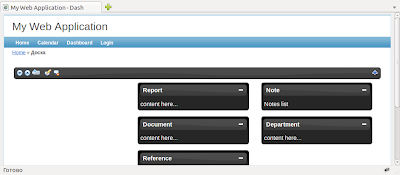
jQueryUI based Dashboard controller.
You can:
- drag/drop portlets
- store user preference in your own table
- set autosave portlets position on/off
- write page's content before and after dashboard
- apply any of jQuery UI theme
- set dashboard columns count
- show/hide dashboard header
- show/hide dashboard
Requirements 
Yii 1.1.5 or above
Usage 
Extend your controller from this dashboard base controller
class DashController extends UIDashboardController
and have fun.
Sample controller is present.
Donate to next release: 
- add feature to store portlet's state
Change log: 
ver 1.1 
(March 10, 2011)
- Added polish translation
(March 4, 2011)
- fixed autosave bug
- fixed double ajax call during autosaving
- rewrite store preference code. Now the record is not completely removed but only updates the "preference" field.
(Thanks Tobias B. for the help)
ver 1.0 
- initial release
 FlyBot
User Contributed Notes 14
Nice!
I have 2 projects that might use an extension like this. I'm looking forward to running some tests.
install
I know this may seem self explanatory, but Install instructions here or in the zip file would help us simple folk.
How to use
Simple unzip this archive under protected folder and look http://localhost/dash in your browser.
Create Database:
Hey guys I create this database:
[sql]
CREATE TABLE `<prefix>dashboard_page` (
  `id` int(11) NOT NULL AUTO_INCREMENT,
  `user_id` int(11) DEFAULT NULL,
  `title` varchar(50) DEFAULT NULL,
  PRIMARY KEY (`id`)
) ENGINE=InnoDB DEFAULT CHARSET=utf8 PACK_KEYS=0;
If your "prefix" is not blanks, yo should change:
"app_roo_dir"/protected/controllers/DashController.php
$this->setTableParams('<prefix>dashboard_page', 'user_id', 'title');Best regards
i just dont know how to use the dashboard_page table
Hai FlyBot
I just dont know how to use the dashboard_page table.. and how it customize the portlet..
@peterjkambey
Portlet is array('id', 'title', 'content').
Example in controllers/DashController.php file.
Portlets use jQuery UI theme from assets/themes.
I just dont know how to use the dashboard_page table also :-)
How to render CGridView Inside portlet?
Is it possible to render CGridView inside the portlet? I tried something like this:
$this->setPortlets(
  array(
    array(
      'id'=>1,
      'title'=>'Flight',
      'content'=>$this->renderpartial('...',null,true)
    ),
  )
);
but keep getting this error:
Fatal error: Call to a member function getId() on a non-object in /.../yii/framework/web/CController.php on line 963Re: How to render CGridView Inside portlet?
I can't find a way to solve this problem without modifying the script a little.
In showDash.php:
<div class="dash-portlet-content">
  <?php
  if ($row['renderPage'])
    $this->renderpartial($row['content']);
  else
    echo $row['content'];
  ?>
</div>
To set the portlet:
$this->setPortlets(
  array(
    array(
      'id'=>1,
      'title'=>'Flight',
      'renderPage'=>true,
      'content'=>'/flight/dashboard' (path of view to be rendered)
    ),
    array('id'=>2, 'title'=>'Maintenance', 'content'=>'Maintenance Summary'),
  )
);
If you use ajax update in your CGridView (like sorting/searching), you may need to use something like livequery plugin so that everything will work properly after ajax refresh. In dashboard.js I add something like:
$('#dash-column td').livequery(function() {
   $( "#dash-column td").sortable({
      opacity: 0.8,
      connectWith: "#dash-column td"
   });
});
Hope this can help someone else in the future. Thanks for the great extension, anyway!
waiting for update...
Thanks so much for your ext....
Would you please write some database tutorial...
or.....any tutorial would be great.
Thanks so much.
Render any component inside portlet
Modify the code to render any component in the protlet
DashController:
$this->setPortlets(
    array(
        array('id'=>1, 'title'=>'Logs', 'renderContent'=>true, 'view'=>'application.views.info.logs', 'info'=>array('dataProvider'=>$this->logs()), 'flag'=>false)
    )
);
public function logs() { $dataProvider = new CActiveDataProvider('Logs'); return $dataProvider; }View showDash:
<div class="dash-portlet-content"> <?php if ($row['renderContent']) { $dataProvider=$row['info']['dataProvider']; $this->renderPartial($row['view'], array('dataProvider'=>$dataProvider), $row['flag']); } else { echo $row['content']; } ?> </div>How to set up
Please, extract all from archive under protected folder and use DashController or just extend your own controller from UIDashboardController. The Controllers init function must set up params for table (table name, user ID field name, user preference field name). Sample: $this->setTableParams('dashboard_table', 'user_id', 'prefference');
Then, set array of portlets (see sample in DashController). You may use $this->setAutosave(true) for saving user's prefference;
How to install
To install you do the following:
This is an additional controller not a extension or module so you don't have to do much to get it to work.
I just used xNicox db table:
create this table in your database
CREATE TABLE `dashboard_page` (
  `id` int(11) NOT NULL AUTO_INCREMENT,
  `user_id` int(11) DEFAULT NULL,
  `title` varchar(50) DEFAULT NULL,
  PRIMARY KEY (`id`)
) ENGINE=InnoDB DEFAULT CHARSET=utf8 PACK_KEYS=0;
Download and extract the files to their locations under your protected file.
i.e. in the download controllers file, put all of its contents in your protected/controllers file. You will do the same for the view and components files.
Go to yourdomainname/dashboard and you can see it. Use the peoples mods in this post to make your other portlets work.
Support
Hi...
Support yii 1.13?
yii cool dashboard
Wow So Cool
This is make beautiful dashboard
Leave a comment
If you have any questions, please ask in the forum instead.
Join the conversation to share a note.