
 AftabHussainSharSukkur
 liam255
You are viewing revision #99 of this wiki article.
This version may not be up to date with the latest version.
You may want to view the differences to the latest version.
- Message to beginners
- Intro
- Major use case: Parent and Child CGridViews on single view
- Another use case: Child-grid in create and update views
This wiki has been updated on 21 May 2012 with the new MODEL METHOD. Please note that the old CONTROLLER METHOD has been removed from this document.
Message to beginners 
I have been a desktop developer for ages, but I'm new to Yii, OOP and web development. It took me months to write this wiki, since I had to start from scratch and work through several books with thousands of pages, and I tried and tested a lot of different things. So if you are also a beginner, take a morning off and thoroughly work through this tutorial. It should give you a good start and save you weeks of struggling - even if you don't use dynamic gridviews.
Intro 
Forgive me for maybe “over-explaining” things a bit, which results in such a lengthy wiki, but I think it could give beginners a better overall picture. And 90% of the stuff you have working already. So the actual new code is not that much.
Many desktop programmers are used to having dynamic forms, where clicking on a record in a parent sub-form, updates another sub-form with the child records. While having many levels of nested sub-forms in a single view might not be such a good idea for a web application, I thought doing it one level deep might be interesting and useful. But, instead of sub-forms I used CGridViews.
Major use case: Parent and Child CGridViews on single view 
The Process (in short) 
If you want to retrieve the child records for a certain parent record, then you would NORMALLY just "read" one of the parent model's relations to the child model.
However, in this example, we do not simply want to display the child records. No, we need much more. We need to be able to manipulate (sort/search/page) the child records in their own CGridView.
So we do this by getting the child records directly from their own model, where their own dataprovider is generated.
So (in short) the process works like this:
The user clicks on a parent record in the parent-CGridView.
The parent record's primary key (PK) is sent to the controller.
The controller passes the PK to the child-model, which uses the PK as a filter for retrieving the relevant child records and storing them in a new dataprovider.
The view receives the new dataprovider and updates the child-CGridView with the new records.
So here we go! *****
Database 
In the database I have a classic many_many relation, which is broken/represented by a junction table. The two outer tables are called "cap_role" (PK: role_id) and "cap_permission" (PK: permission_id). The junction-table in the middle is called cap_role_permission (PK: rolepermission_id) (Unique: role_id, permissionid). (Tables are prefixed by "cap".)
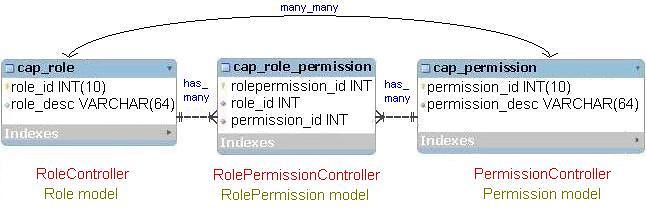
The idea is that you link permissions to roles (users will later be given roles). So obviously, a role could have many permissions, and a permission could also be assigned to many roles.
(Yii calls the direct relation between the two outer tables - with the junction table between them - a many_many relation. But you still must have the junction table in the middle! So there is no real many_many relation in the database.
Yii's many_many relation is thus simply a way of using one of the outer table’s models, and then getting data directly from the other outer table – without having to work “through” the junction table (like in sql). But in the background Yii still works through the junction table, so you still need it in the database. That is also why you will have to specify the cap_role_permission table, as part of the many_many relation between the outer tables.
Having said that, this wiki does not use the many_many relation any more.)
Overview 
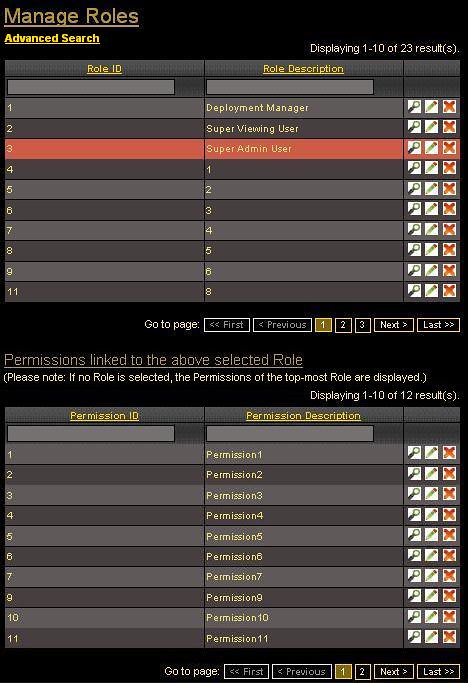
I used the views/role/admin view for al the action. The parent-gridview displays the default Role models. The child-gridview uses a different model - the RolePermission model - to display the permission_id of the relevant cap_role_permission records. In addition, the RolePermission model uses its relation with the Permission model to also display the permission_desc fields of the related cap_permission records.
Views 
My views\role\admin.php view:
<h1>Manage Roles</h1>

<?php echo CHtml::link('Advanced Search','#',array('class'=>'search-button')); ?>
<div class="search-form" style="display:none">
	<?php $this->renderPartial('_search',array(
		'model'=>$parent_model,
	)); ?>
</div><!-- search-form -->

<div id="parentView">
	<?php
		/*For the above "Advanced Search" function to work, keep the gii
		generated id for the parent CGridView.
		In this case it is "role-grid".
		If you do want to change it to something else - like parent-grid -
		then also change the name in the javascript 'search' function, that
		is normally located just above the "Advanced Search" function.

		Add the line: 'ajaxUpdate' => 'child-grid', to the role-grid. This
		ensures that the child-grid is also refreshed when the role-grid
		is sorted/filtered/paged via the build-in Yii ajax.
		How does it work: Ajax is suppose to update only certain sections
		of a view (on the client), with data specific to that section,
		which is obtained from the controller and/or model (on the server).

		So ajax is about speed, because you don't need to wait for the
		entire page's data each time you want to update a section.

		However, Yii's ajax when doing gridview sorting, filtering and
		pagination works differently. In these cases, the entire view is
		still rendered to the client, but Yii then only refreshes the
		gridview and ignores the rest of the received data. For this
		reason, the default gii generated actionAdmin has only one
		render function, which renders the entire view - regardless of
		whether the event refreshes the whole page or actually needed only
		a section of the view. (This way of treating ajax, only pertains
		to CGridViews in gii generated controllers. You could change it if
		you want - since gii is only intended to give you a platform to
		start from. But I'm also sure it will be improved in future Yii
		releases.)

		In our example, when the role-grid gets sorted, 'ajaxUpdate' =>
		'child-grid' tells Yii to also extract the child-grid's data from
		the received view and to update it together with the role-grid.
		(If you have dynamic headings in the childView, or other data that
		also needs to be updated, then use 'ajaxUpdate' => 'childView'.
		This will update the entire childview with all its heading as well
		as the child-grid inside the childView.)
		Please note that 'ajaxUpdate' is part of the build-in Yii ajax.
		It is NOT part of our own custom ajax function (GROUP B 3.1 in the
		actionAdmin of the RoleController), which we will use to only
		retrieve data for the child-grid, and update only the child-grid,
		after a row in the role-grid was clicked.*/
		$this->widget('zii.widgets.grid.CGridView', array(
			'id'=>'role-grid',
			'dataProvider'=>$parent_model->search(),
			'filter'=>$parent_model,
			'columns'=>array(
				'role_id',
				'role_desc',
				array(
					'class'=>'CButtonColumn',
				),
			),
			'ajaxUpdate' => 'child-grid',
		));
	?>
</div>

<!-- Use this paragraph to display the loading.gif icon above the Child Gridview,
while waiting for the ajax response -->
<p id="loadingPic"></br></p>

<!-- The childView <div>, renders the _child form, which contains the Child Gridview.
The ajax response will replace/update the whole <div> and not just the gridview. -->
<div id="childView">
	<?php
		$this->renderPartial('_child', array(
		'child_model' => $child_model, /* New */
		'parentID' => $parentID, /* New */
		))
	?>
</div>

<?php
	/*Load the javascript file that contains the ajax function*/
	$path = Yii::app()->baseUrl.'/js/customFunctions.js';
	Yii::app()->clientScript->registerScriptFile($path,
	CClientScript::POS_END);
?>
The following _child.php form contains the Child CGridView. The gridview receives a dataprovider using the searchIncludingPermissions($parentID) function in the RolePermission model. The same function is used for filtering and sorting. (Note that the controller sets $child_model to refer to the RolePermission model and not to the default Role model).
Under the gridview’s columns we have the RolePermission model’s permission_id and the related Permission model’s permission_desc. Since permission_desc is a related field with sorting and filtering enabled, it should be specified in this special way.
Note that the buttons in this gridview have been customized to use the child records' controller (RolePermissionController) and not the default RoleController. If you think this will confuse the user, take them out. However, I think it could be a lovely feature if you have, for example, school classes in the parent-gridview and students in the child-gridview. By clicking on a class in the parent-gridview, the child-gridview displays a list of the students in that class and you can immediately update a student's details by clicking the update button in the child-gridview. Having said that, I would only have 'update' buttons in the child-gridview, otherwise it could get confusing. You can also link these buttons to the PermissionController if required.
To only show the 'update' button, change the template to the following:'template'=>'{update}',
You can read more about this here: CButtonColumn
The first paragraph uses the subsectionheading CSS class. You can obviously change that to your own CCS class.
<p id="subsectionheading">Permissions linked to the above selected Role</p>
<div class="hint">(Please note: If no Role is selected, the Permissions of the top-most Role are displayed.)</div>

<?php
	$this->widget('zii.widgets.grid.CGridView', array(
	'id'=>'child-grid',
	'dataProvider'=>$child_model->searchIncludingPermissions($parentID),
	'filter'=>$child_model,
	'columns'=>array(
		'permission_id',
		array(
			'name'=>'permission_desc_param',
			'value'=>'($data->relPermission)?$data->
				relPermission->permission_desc:""', /* Test for
				empty related fields not to crash the program */
			'header'=>'Permission Description',
			'filter' => CHtml::activeTextField($child_model,
			'permission_desc_param'),
		),
		array(
			'class'=>'CButtonColumn',
			'template'=>'{view}{update}{delete}',
			'viewButtonUrl' => 'array("rolepermission/view",
			"id"=>$data->permission_id)',
			'updateButtonUrl' => 'array("rolepermission/update",
			"id"=>$data->permission_id)',
			'deleteButtonUrl' => 'array("rolepermission/delete",
			"id"=>$data->permission_id)',
		),
	),
));
?>
CSS 
The CSS for the paragraph displaying the loading.gif icon (this is toggled in our ajax function). You can find a loading.gif file in your local Yii installation:
.loadGIF {
	background: black url(/main/sub/css/images/general/loading.gif) left center no-repeat ;
}
The RoleController 
To understand what is happening in the RolePermission model, you first have to know what the controller is doing. Hence my lengthy comments:
public function actionAdmin()
	{
		/* The Parent CGridView in the admin view is called 'role-grid',
		which is Yii's default id for the CGridView displaying the Role
		models. The Child CGridView is called 'child-grid'.

		When a row in role-grid is clicked, our custom ajax function
		extracts the row's primary key and stores it in a variable called
		parentID, which is then passed to this actionAdmin.

		However, this actionAdmin is called by quite a few other
		events/functions (done by Yii) as well, but not all of them also
		pass the stored parentID to actionAdmin.

		Thus, I have divided the events into Groups A and B:

		GROUP A	(Events that DO NOT pass parentID to actionAdmin):

			At all times:
			1.1	Initial rendering/refeshing of the 'admin' form,
				displaying both role-grid and child-grid;
			1.2	role-grid sorting (Yii ajax),
			1.3	role-grid filtering (Yii ajax),
			1.4	role-grid pagination (Yii ajax).

			Only BEFORE any role-grid data row was clicked:
			2.1	child-grid sorting (Yii ajax),
			2.2	child-grid filtering (Yii ajax),
			2.3	child-grid pagination (Yii ajax).

		GROUP B	(Events that DO pass parentID to actionAdmin):

			At all times:
			3.1	role-grid clicking (own custom ajax function).

			Starting only AFTER any role-grid row was clicked:
			4.1	child-grid sorting (Yii ajax),
			4.2	child-grid filtering (Yii ajax),
			4.3	child-grid pagination (Yii ajax).

		Note that 4.1 - 4.3 are the same events as 2.1 - 2.3, but they
		only start passing the parentID	after a data row in the role-grid
		was clicked. Again, these are all Yii events and we don't have
		control over how they are functioning (unless you want to change
		the Yii	files). So, we only have control over what 3.1 is doing,
		but for	the rest we have to cater for their behaviours.*/

		/*When actionAdmin is used by any of the above events, we don’t
		know which event it is and we don't know if it is the first time
		actionAdmin is being used by that event.
		We also don’t know if the user has entered any text (filtering
		parameters) in the gridview’s “search” textfields, which should be
		used to filter the column’s data.

		To prepare for all these possible scenarios, gii generates the
		standard actionAdmin functions to do more or less the following:

		Process1:
			Create a single model instance in which to store the
			user’s filtering parameters – if any.
		Process2:
			Test if the event currently using actionAdmin, passed it
			any filtering parameters that the user might have entered.
			If such parameters are found, store them in the newly
			created model instance.
		Process3:
			Render the view and pass it this single model instance.

		In the view and model, the following happens:
		Process4:
			The view renders the gridview,
		Process5:
			which passes this single model instance to the
			model’s search() function,
		Process6:
			which incorporates the filtering parameters into a
			dataprovider
		Process7:
			and returns the dataprovider to the gridview to use as
			data records.

		(I hope I have that right, but I think it is pretty close.)

		This actionAdmin has a few additional tests/processes and it works
		with two models, but the basic functioning is the same.*/


		/* Create a single parent-model instance (using the Role model's
		search function), which will hold the role-grid's filtering
		parameters entered by the user (not the	gridview's data records).*/
		$parent_model = new Role('search');

		/* Empty the newly created parent-model instance to clear all
		default parameters.*/
		$parent_model->unsetAttributes();

		/* Test if the event that is currently calling this action, passed
		any filtering parameters that the user might have entered in the
		role-grid.
		If true, store these parameters in the newly created parent-model
		instance. */
		if(isset($_GET['Role']))
			$parent_model->attributes=$_GET['Role'];

		/* Test if the event that is currently using this action, is from
		Group A or B */
		if(!isset($_GET['parentID'])){
			/* The event using this action now, is from Group A:*/
			$group = "A";

			/*The parentID was not passed to the controller and since
			we do not know which event is currently using actionAdmin
			(could be refreshing, sorting, paging, etc.), we do not
			know what records to display in the child-grid.
			So we need to find out which record will next be displayed
			at the top of the role-grid - considering all the
			filtering parameters (stored in our single parent-model
			instance) that we might/might not have received	from the
			event.

			Then we need to extract that top record's PK so that we
			can pass it to the view	to use it to generate the child-
			gridview's dataprovider.

			So the easiest way of doing this is to copy-cat the
			model's search() function (which will be used to generate
			the role-grid's real dataprovider).

			I thus created a temporary dataprovider in the controller,
			in which I incorporated all the filtering parameters
			received from the event - if any.

			NOTE: This way of obtaining the role-grid's first
			record-to-be, could most probably be done in another way.
			For example:
			I tried to extract the first record from the real
			dataprovider after it was generated in the model
			(Process6). But the problem is that you cannot then pass
			control back to the controller to continue testing how the
			child-gridview should be generated, because control has
			then been passed to Process7, which renders the views.

			And if you want the view (in Process7) to render the child-
			gridview via another ajax function, that would probably
			result in a further round trip to the server. Creating
			a temporary dataprovider in the controller is much faster.

			And if you store the PK in the model or in the session
			state during Process6, you still have to wait until one of
			the events in Process7 calls the controller and passes it
			the PK together with any new filtering criteria. However,
			by that time the PK is OLD NEWS, because the new event
			would normally result in a different first role-grid
			record being needed.

			So for these reasons, I obtain the first record-to-be
			directly in the controller, before the child-gridview is
			generated.

			(Note: I tried to limit the records in this dataprovider
			by adding 'pagination' => array('pageSize' => 1,), but
			since pagination then behaves differently from that
			of the real dataprovider in the model, the record-to-be
			would differ, resulting in the child-grid displaying the
			wrong records. So this dataprovider should be identical to
			that in the model's search() function.) */
			$criteria=new CDbCriteria;

			$criteria->compare('role_id',$parent_model->role_id,true);
			$criteria->compare('role_desc',
			$parent_model->role_desc,true);

			$dataProvider = new CActiveDataProvider('Role',
				array(
					'criteria'=>$criteria,
				));

			/* Test if the dataProvider found any data (filtering
				parameters might have excluded all records)*/
			If (count($dataProvider->getData()) > 0) {
				/* Extract the first model from the dataprovider */
				$first_model=$dataProvider->getData();

				/* Extract the record's PK, to be used to generate
				the child-gridview's data records.*/
				$parentID = $first_model[0]->role_id;
			}
			else{
				/* Set $parentID to 0, to return an empty child-
				grid.*/
				$parentID = 0;
			}
		}
		else{
			/* The event using this action, is from Group B: */
			$group = "B";

			/* Get the parentID, which the event passed to this
			action.*/
			$parentID = $_GET['parentID'];
		}

		/* Create a single child-model instance which will hold the child-
		grid's filtering parameters entered by the user (not the
		gridview's data records).
		To create this child-model instance, use the custom
		searchIncludingPermissions function of the RolePermission model,
		passing it the parentID. */
		$child_model = new
			RolePermission("searchIncludingPermissions($parentID)");

		/* Empty the newly created child-model instance to clear all
		default parameters.*/
		$child_model->unsetAttributes();

		/*Put the child-model instance in the searchIncludingPermissions
		scenario. See the RolePermission model for more details on this
		scenario. */
		$child_model->scenario = 'searchIncludingPermissions';

		/* Test if the event that is currently calling this action, passed
		any filtering parameters that the user might have entered in the
		child-grid.
		If true, store these parameters in the newly created child-model
		instance. */
		if(isset($_GET['RolePermission']))
			$child_model->attributes=$_GET['RolePermission'];

		/* Test if the event that is currently using this action, is from
		Group A or B */
		if($group == "A"){
			/* GROUP A:
			Render the 'admin' form while passing it $parentID and
			both model instances (containing the user's filtering
			parameters - if any).
			The form's gridviews will also use the Role->search() and
			RolePermission->searchIncludingPermissions($parentID)
			functions to create their own dataproviders.
			These functions will incorporate $parentID and any
			received filtering parameters contained in the two model
			instances.

			Note that the whole admin view is rendered (default gii
 			way of doing it), even if the event currently using this
			action might be	one of the Yii ajax functions (GROUP A,
			1.2 - 2.3), which would normally only require a section of
			the view. See the role-grid in the admin.php view for more
			information on why the whole admin view is rendered. */
			$this->render('admin',array(
				'parent_model'=>$parent_model,
				'child_model'=>$child_model,
				'parentID' => $parentID,
			));
		}
		else{
			/* GROUP B:
			Render only the '_child' form while passing it $parentID
			and the single child-model instance (containing the user's
			filtering parameters - if any).
			The form's gridview will use the
			RolePermission->searchIncludingPermissions($parentID)
			function to create it's own dataprovider.
			This function will also incorporate $parentID and any
			received filtering parameters contained	in the single
			child-model instance.*/
			$this->renderPartial('_child', array(
				'child_model'=>$child_model,
				'parentID' => $parentID,
			));
		}
	}
Models 
There is nothing special about the Role model, which will be used as default model for the role-grid. So you can use the standard gii generated Role model.
There is no need to use the Permission model (for the cap_permission table) since I'm directly obtaining the permission_desc field by using the relPermission relation in the RolePermission model.
The RolePermission model looks like this:
<?php

class RolePermission extends CActiveRecord
{
	/* This variable is used to store the parameters enetered by the user for
	filtering the child-gridview's Permission Description column*/
	public $permission_desc_param;

	/**
	 * Returns the static model of the specified AR class.
	 * @param string $className active record class name.
	 * @return RolePermission the static model class
	 */
	public static function model($className=__CLASS__)
	{
		return parent::model($className);
	}

	/**
	 * @return string the associated database table name
	 */
	public function tableName()
	{
		return '{{role_permission}}';
	}

	/**
	 * @return array validation rules for model attributes.
	 */
	public function rules()
	{
		// NOTE: you should only define rules for those attributes that
		// will receive user inputs.
		return array(
			array('role_id, permission_id',	'required'),
			array('role_id, permission_id',	'length', 'max'=>10),
			// The following rule is used by search().
			// Please remove those attributes that should not be
			searched.
			array('role_id, permission_id,
				permission_desc_param', 'safe', 'on'=>'search,
				searchIncludingPermissions'),
		);
	}

	/**
	 * @return array relational rules.
	 */
	public function relations()
	{
		// NOTE: you may need to adjust the relation name and the related
		// class name for the relations automatically generated below.
		return array(
			'relRole' => array(self::BELONGS_TO, 'Role', 'role_id'),
			'relPermission' => array(self::BELONGS_TO, 'Permission',
			'permission_id'),
		);
	}

	/**
	 * @return array customized attribute labels (name=>label)
	 */
	public function attributeLabels()
	{
		return array(
			'rolepermission_id' => 'Rolepermission ID',
			'role_id' => 'Role ID',
			'permission_id' => 'Permission ID',
			'system_record' => 'System Record',
		);
	}

	/**
	 * Retrieves a list of models based on the current search/filter
	conditions.
	 * @return CActiveDataProvider the data provider that can return the
	models based on the search/filter conditions.
	 */
	public function search()
	{
		// Warning: Please modify the following code to remove attributes
		// that should not be searched.
		$criteria=new CDbCriteria;
		$criteria->compare('rolepermission_id',
			$this->rolepermission_id,true);
		$criteria->compare('role_id',$this->role_id,true);
		$criteria->compare('permission_id',$this->permission_id,true);

		return new CActiveDataProvider($this, array(
			'criteria'=>$criteria,
		));
	}

	public function searchIncludingPermissions($parentID)
	{
		/* This function creates a dataprovider with RolePermission
		models, based on the parameters received from the controller. It
		also includes related Permission models, obtained via the
		relPermission relation. */
		$criteria=new CDbCriteria;
		$criteria->with=array('relPermission');
		$criteria->together = true;


		/* filter on role-grid PK ($parentID) received from the
		controller*/
		$criteria->compare('t.role_id',$parentID,false);

		/* Filter on default Model's column if user entered parameter*/
		$criteria->compare('t.permission_id',$this->permission_id,true);

		/* Filter on related Model's column if user entered parameter*/
		$criteria->compare('relPermission.permission_desc',
			$this->permission_desc_param,true);

		/* Sort on related Model's columns */
		$sort = new CSort;
		$sort->attributes = array(
			'permission_desc_param' => array(
			'asc' => 'permission_desc',
			'desc' => 'permission_desc DESC',
			), '*', /* Treat all other columns normally */
		);
		/* End: Sort on related Model's columns */

		return new CActiveDataProvider($this, array(
			'criteria'=>$criteria,
			'sort'=>$sort, /* Needed for sort */
		));
	}
}
So what is happening in this model?
Normally CgridViews get their data records by using the model’s search() function, which returns a dataprovider.
I did not want to amend the model’s search() function, because other controllers need to use it as well. So I created a new function called searchIncludingPermissions(). This function performs the same basic tasks as the search() function, but it also:
includes the related permission records via the model's relPermission relation;
filters the child records on the role-grid's PK ($parentID received from the controller);
filters the child records on the user entered parameters (received from the controller in the single child-model instance),
takes care of child-gridview sorting and pagination AFTER a row in role-grid was clicked.
The searchIncludingPermissions() function receives the $parentID parameter from the controller.
The $criteria->compare('t.role_id', $parentID,false) statement filters the child records - comparing their role_id to $parentID - only allowing an exact match (false). This filtering occurs regardless of whether the user included additional filtering parameters.
The next two compare statements filter the user's filtering parameters – if any:
$criteria->compare('t.permission_id',$this->permission_id,true); “$this” refers to the single model instance received from the controller, so $this->permission_id will contain any filtering parameters that the user might have entered in the child-gridview’s permission_id column. So the above statement compares the dataprovider (to be created) records with the single model instance received from the controller.
But there is a problem with the next compare statement: The models to be created in the real dataprovider will have the following structure:
rolepermission_id
role_id
permission_id
relPermission.permission_id
relPermission.permission_desc
However, the single model instance created by the controller to store the user’s filtering parameters, does not have the same structure. It does not contain fields to store the user’s filter parameters for the RELATED fields (due to lazy loading):
rolepermission_id
role_id
permission_id
relPermission
Therefore you can’t write the last compare statement like this:
$criteria->compare('relPermission.permission_desc',$this->relPermission->permission_desc,true);
So the answer to this problem is to create a separate public variable in the model and use it to store the user’s filter parameter for the related column. This public variable is declared at the top of the model, called permission_desc_param.
Now we can use it in the compare statement:
$criteria->compare('relPermission.permission_desc',$this->permission_desc_param,true);
You can read more about this solution here: Searching and sorting by related model
The permission_desc_param variable is also used in the child-gridview’s column filter (see the child-grid in the _child.php view).
permission_desc_param also needs to be included in this model's safe rule.
Important: For the safe rule to also be applied to the searchIncludingPermissions function, the rule must be amended to also work for the "searchIncludingPermissions" scenario, and not just for the default search scenario. array('..., permission_desc_param', 'safe', 'on'=>'search, searchIncludingPermissions') You will remember that the controller placed the single model instance in the searchIncludingPermissions scenario.
Scenarios are simply used to enforce different model rules at different times. You can read more about scenarios here: Model rules validation
The Ajax (extracting data from CGridView and passing it to controller) 
The ajax in the separately loaded javascript file - called customFunctions.js
Different Javascript, Ajax and Jquery options 
I first used the role-grid's own selectionChanged event to update the child-grid, but that caused problems when the user clicked the same row twice, since the second click deselected the same row that has just been selected by the first click. This deselecting of the row caused $.fn.yiiGridView.getSelection() not to be able to get the PK of the clicked row. (This could be a good option if you want the child gridview to disappear when the user deselects a Role row or pages the role-grid. However, I wanted the child-grid displayed at all times.)
I then used pure ajax with a function that checked the readyState from the server’s response after the ajax call. However, the function worked fine in Firefox but not in Internet Explorer 8.
After that, I used jquery's $('#role-grid table tbody tr').click(function(){. This function binds a click event handler on all data-rows in the role-grid. However, whenever the gridview was paged, these rows - and their assigned event handlers - no longer existed.
I then moved to using jquery's Event Delegation: It binds an "on()" event handler to the parentView div, which is the role-grid's parent.
This handler first watched for click events bubbling up when the user clicks one of the gridview's data rows. However, the rows also fired a click event if the user clicked one of the buttons in the row - which is not what I wanted.
So finally, I changed the script to check for clicking events coming from a row's columns (except the button-column). The first line thus binds an event handler on the outer parent - the parentView div. This handler looks for click-events bubbling up from any data-row (tbody) columns (td) that are not of class button-column.
$('#parentView').on("click", "table tbody td:not(td:.button-column)", function(event){

	try{
		/*Extract the Primary Key from the CGridView's clicked row.
		"this" is the CGridView's clicked column or <td>.
		Go up one parent - which gives you the row.
		Go down to child(1) - which gives you the first column,
			containing the row's PK. */
		var gridRowPK = $(this).parent().children(':nth-child(1)').text();

		/*Display the loading.gif file via jquery and CSS*/
		$("#loadingPic").addClass("loadGIF");

		/* Call the Ajax function to update the Child CGridView via the
 		controller’s actionAdmin */
		var request = $.ajax({
		  url: "Admin",
		  type: "GET",
		  cache: false,
		  data: {parentID : gridRowPK},
		  dataType: "html"
		});

		request.done(function(response) {
			try{
				/*since you are updating innerHTML, make sure the
				received data does not contain any javascript -
				for security reasons*/
				if (response.indexOf('<script') == -1){
					/*update the view with the data received
					from the server*/
			document.getElementById('childView').innerHTML = response;
				}
				else {
					throw new Error('Invalid Javascript in
					Response - possible hacking!');
				}
			}
			catch (ex){
				alert(ex.message); /*** Send this to the server
				for logging when in production ***/
			}
			finally{
				/*Remove the loading.gif file via jquery and CSS*/
				$("#loadingPic").removeClass("loadGIF");

				/*clear the ajax object after use*/
				request = null;
			}
		});

		request.fail(function(jqXHR, textStatus) {
			try{
				throw new Error('Request failed: ' + textStatus );
			}
			catch (ex){
				alert(ex.message); /*** Send this to the server
				for logging when in production ***/
			}
			finally{
				/*Remove the loading.gif file via jquery and CSS*/
				$("#loadingPic").removeClass("loadGIF");

				/*clear the ajax object after use*/
				request = null;
			}
		});
	}
	catch (ex){
		alert(ex.message); /*** Send this to the server for logging when
		in production ***/
	}
});
CHtml::ajax or $.ajax 
You can either use CHtml::ajax or $.ajax (also called JQuery.ajax) (see http://api.jquery.com/jQuery.ajax/ for more examples).
CHtml::ajax and $.ajax do the same job. However CHtml::ajax is a Yii based PHP function. It must be stored in the view and not in a separate javascript file.
If you want to store your function in a separate javascript file, then use $.ajax.
"Both CHtml::ajax and $.ajax will take care of browser inconsistencies and will also help you with all the "readyState" and "ActiveXObject" (pure ajax) stuff. You don't have to worry about such things anymore, just focus on the interesting parts." (thank you for clearing that up Haensel).
Personally, I prefer putting my functions in separate javascript files, because it allows you to re-use your code. Haensel also mentioned that it makes debugging easier. Some experts also say that $.ajax gives you more control.
Records and models 
I often talk about records instead of models or model instances – but I think you get the idea. For those who do not know it yet (like myself, when I switched to OOP) the differences between records and models are:
a record is a single row of data in a database table;
a model consists of many things such as:
the record;
rules to be applied to each record;
rules for filtering records;
custom naming of fields in the record;
relations with other models;
your own custom functions;
arrays of data that you want to use in your code;
anything else you want to add – maybe sql, etc.;
Another use case: Child-grid in create and update views 
Overview 
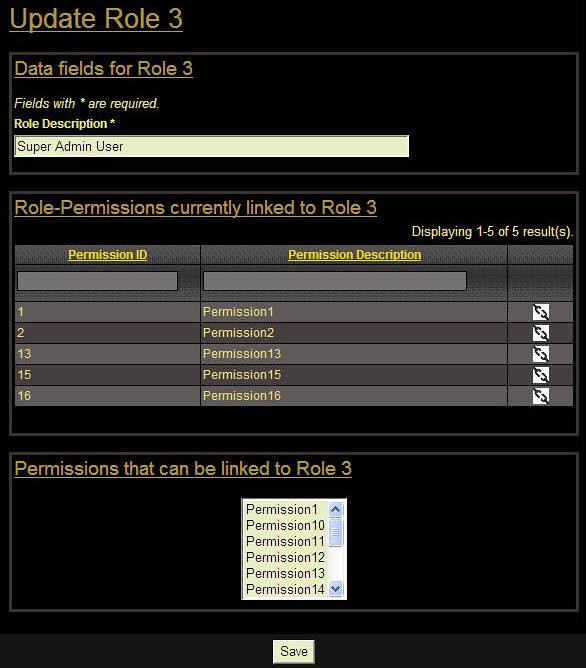
I put the parent and child gridviews in the 'admin' view, but the following use case of the 'create' and 'update' views, will allow you to add/delete permissions to roles by adding/deleting records directly in the junction table.
In the Admin view, the user clicks on an update button of the role-grid, which displays the update view for that role.
At the top of the update view, you have the role’s data, as normal.
Below that, you have a child gridview, displaying the permissions linked to the above role.
Give the child gridview delete buttons that use the RolePermissionController to delete the records from the junction table. (The child gridview is only displayed when parent records are updated - not when they are created.)
Below the child gridview, add a dropDownList where the user can select new permissions (using child_models or maybe the Permission model directly) to be linked to the role (new records are added to the junction table in the RoleController).
Be careful: Be very careful when deleting records. If your database is using cascading to ensure referential integrity, you might be deleting records from other tables without even knowing it. So rather just flag your records as being deleted (and then scope them out with "default scope" or something) or at least test to make sure the records have not been referenced in other tables.
Although this is not a pure "dynamic gridviews" scenario, it is very handy.
The RoleController 
/**
 * Creates a new model.
 * If creation is successful, the browser will be redirected to the 'view' page.
 */
public function actionCreate()
{
	$parent_model=new Role;
	$parentID = 0;

	// Uncomment the following line if AJAX validation is needed
	// $this->performAjaxValidation($parent_model);

	/* Create a single child-model instance which will hold the child-grid's
	filtering parameters entered by the user (not the gridview's data records).
	To create this child-model instance, use the custom
	searchIncludingPermissions function of the RolePermission model, passing it
	the parentID. */
	$child_model = new RolePermission("searchIncludingPermissions($parentID)");

	/* Empty the newly created child-model instance to clear all parameters.*/
	$child_model->unsetAttributes();

	/*Put the child-model instance in the searchIncludingPermissions scenario
	to activate the model's safe rule when using the searchIncludingPermissions
	function. See the RolePermission model (in the Model method) for more
	details on this scenario. */
	$child_model->scenario = 'searchIncludingPermissions';

	/*Test if the event currently using this action passed it any data to save*/
	if(isset($_POST['Role']))
	{
		$parent_model->attributes=$_POST['Role'];

		if($parent_model->save())/* Save the Role model */
		{
			/*The new role_id (auto increment) is only available after
			 the parent record was saved. It is needed to create the
			 child records. */
			$parentID = $parent_model->role_id;

			/*Test if the dropDownList, which uses a child_model
			 (RolePermission), passed any data in its permission_id
			 array */
			if(($_POST['RolePermission']['permission_id'])<>'')
			{
				foreach ($_POST['RolePermission']['permission_id']
				as $permissionId) {
					$this->linkChildRecord($parentID, $permissionId);
				}
			}

			/*Redirect to actionUpdate, because if you stay on the
			 create view a duplicate record would be created if the
			user clicks the "Save" button */
			$this->redirect(array('update','id'=>$parentID));
		}
	}

	/*Render the create view - passing it all the filtering data it might need*/
	$this->render('create',array(
		'parent_model'=>$parent_model,
		'child_model'=>$child_model,
		'parentID' => $parentID
	));
}

/**
 * Updates a particular model.
 * If update is successful, the browser will be redirected to the 'view' page.
 * @param integer $id the ID of the model to be updated
 */
public function actionUpdate($id)
{
	$parent_model=$this->loadModel($id);
	$parentID = $id;

	// Uncomment the following line if AJAX validation is needed
	// $this->performAjaxValidation($parent_model);

	/*Test if the event currently using this action passed it any data to save*/
	if(isset($_POST['Role']))
	{
		$parent_model->attributes=$_POST['Role'];
		if($parent_model->save())/* Save the Role model */
		{
			/*Test if the dropDownList, which uses a child_model
			 (RolePermission), passed any data in its permission_id
			 array */
			if(($_POST['RolePermission']['permission_id'])<>'')
			{
				foreach ($_POST['RolePermission']['permission_id']
				as $permissionId) {
					$this->linkChildRecord($parentID, $permissionId);
				}
			}

			/* Here I choose to stay on the update view and not to
			 redirect*/
			/*$this->redirect(array('view','id'=>$parent_model->
			role_id));*/
		}
	}

	/* Create a single child-model instance which will hold the child-grid's
	filtering parameters entered by the user (not the gridview's data records).
	To create this child-model instance, use the custom
	searchIncludingPermissions function of the RolePermission model, passing it
	the parentID. */
	$child_model = new RolePermission("searchIncludingPermissions($parentID)");

	/* Empty the newly created child-model instance to clear all parameters.*/
	$child_model->unsetAttributes();

	/*Put the child-model instance in the searchIncludingPermissions scenario
	 to activate the model's safe rule for the searchIncludingPermissions
	function. See the RolePermission model for more details on this scenario. */
	$child_model->scenario = 'searchIncludingPermissions';

	/* Test if the event that is currently calling this action, passed any
	filtering parameters that the user might have entered in the child-grid.
	If true, store these parameters in the newly created child-model instance.*/
	if(isset($_GET['RolePermission']))
		$child_model->attributes=$_GET['RolePermission'];

	/*Render the update view - passing it all the filtering data it might need*/
	$this->render('update',array(
		'parent_model'=>$parent_model,
		'child_model'=>$child_model,
		'parentID' => $parentID
	));
}

/*This function is used by both the create and update actions, to create the
records in the junction table */
private function linkChildRecord($parentID, $permissionId)
{
try {
	/*Test if a RolePermission record with this "role_id ($parentID) &
	 permission_id"	combination already exists*/

	/* I used injection safe DAO sql, because it is faster than
	ActiveRecord and here we don't need all the model functionality that
	ActiveRecord provides */
	$sql=
	"SELECT	cap_role_permission.rolepermission_id
	 FROM cap_role_permission
	 WHERE
		cap_role_permission.role_id=:varRoleId and
		cap_role_permission.permission_id=:varPermissionId";

	$connection=Yii::app()->db;
	$command=$connection->createCommand($sql);
	$command->bindValue(':varRoleId',$parentID);
	$command->bindValue(':varPermissionId',$permissionId);
	$row=$command->queryRow();
	If ($row <> ""){
		/* Record already exists in RolePermission. Take no action or let
		 the user know. */
	}
	else{ /* Insert the new RolePermission record. */
		try{
			$rolePermission = new RolePermission;
			$rolePermission->role_id = $parentID;
			$rolePermission->permission_id = $permissionId;
			$rolePermission->save();
		}
		catch(Exception $e){
			echo($e);
		}
	}

}
catch(Exception $e)
{
	echo($e);/* an exception is raised if ANY of the sql statements fails */
}
}

/*If you have lots of validation rules for your junction table (role_permission), then it is better to use ActiveRecord. The above function could look like this: */
private function linkChildRecord($parentID, $permissionId)
{
	$model=new RolePermission;
	$model->role_id =  $parentID;
	$model->permission_id =  $permissionId;
	$model->save();
}
The views 
views/role/create.php
<h1>Create Role</h1>

<?php
	echo $this->renderPartial('_form', array(
	'parent_model'=>$parent_model,
	'child_model' => $child_model,
	'parentID' => $parentID,
	));
?>
views/role/update.php
<h1>Update Role <?php echo $parent_model->role_id; ?></h1>

<?php
	echo $this->renderPartial('_form', array(
	'parent_model'=>$parent_model,
	'child_model' => $child_model,
	'parentID' => $parentID,
	));
?>
views/role/_form.php is used by both create.php and update.php.
<div class="form">

	<?php $form=$this->beginWidget('CActiveForm', array(
			'id'=>'role-form',
			'enableAjaxValidation'=>false,
		)); ?>

		<div class="solid_border">
			<p class="subsectionheading1">
				<?php
					If(!$parent_model->isNewRecord){
						echo ("Data fields for Role " . $parentID );
					}
					else{
						echo ("Data fields for new Role");
					}
				?>
			</p>

			</br>

			<p class="note">Fields with <span class="required">*</span>
			are required.</p>

			<?php echo $form->errorSummary($parent_model); ?>

			<div class="row">
				<?php echo $form->labelEx($parent_model,'role_desc'); ?>
				<?php echo $form->textField($parent_model,'role_desc',array
				('size'=>60,'maxlength'=>64)); ?>
				<?php echo $form->error($parent_model,'role_desc'); ?>
			</div>

		</div></br>

		<!-- Use PHP if-statement that allows HTML in result -->
		<?php if (!$parent_model->isNewRecord) : ?>
			<div id="childgrid" class="solid_border">
				<p class="subsectionheading1">Role-Permissions currently linked
				to Role <?php echo $parentID ?></p>
				<?php
					$this->widget('zii.widgets.grid.CGridView', array(
						'id'=>'child-grid',
						'dataProvider'=>$child_model->searchIncludingPermissions
						($parentID),
						'filter'=>$child_model,
						'columns'=>array(
							'permission_id',
							array(
								'name'=>'permission_desc_param',
								'value'=>'($data->relPermission)?$data->
								relPermission->permission_desc:""',
								'header'=>'Permission Description',
								'filter' => CHtml::activeTextField($child_model,
								'permission_desc_param'),
							),
							array(
								'class'=>'CButtonColumn',
								'template'=>'{delete}',
								'deleteButtonUrl' => 'array
								("rolepermission/delete", "id"=>$data->
								rolepermission_id)',
								'deleteButtonLabel' => 'Delete Link',
								'deleteButtonImageUrl' => Yii::app()->request->
								baseUrl.'/images/css/gridview/delink.png',
								'deleteConfirmation' =>
								"Are you sure you want to detach this Permission
								from the Role?\n\n (Neither the Permission nor
								the Role will be deleted. Only the link between
								them (RolePermission) will be deleted.)",
							),
						),
					));
				?>
			</div></br>
		<?php endif; ?>

		<div class="solid_border">
			<p class="subsectionheading1">
				<?php
					If(!$parent_model->isNewRecord){
						echo ("Permissions that can be linked to Role " .
							 $parentID );
					}
					else{
						echo ("Permissions that can be linked to the new Role ");
					}
				?>
			</p>
			<div class="textaligncenter">
				</br>
				<?php
					$listData = CHtml::listData(Permission::model()->findAll(),
							'permission_id', 'permission_desc');

					asort($listData); /* sort dropDownList data */

					echo $form->dropDownList($child_model,'permission_id',
						$listData,
						array(
							'id'=>'newPermissions',
							'multiple' => 'multiple',
							'size'=>'6')
						);
				?>

				<?php echo $form->error($child_model,'permission_id'); ?>
			</div>
		</div>

		</br>

		<!-- Display the submit button on the BottomBar -->
		<div id="shortBottomBar">
			<?php echo CHtml::submitButton($parent_model->isNewRecord ?
				 'Create' : 'Save'); ?>
		</div>

	<!-- The dropDownList must be included BEFORE this endWidget() function,
	 otherwise its selected rows will not be submitted to the controller -->
	<?php $this->endWidget(); ?>

</div><!-- form -->
Fix the submit button to the bottom of the screen 
If you also want to fix your submit button to the bar at the bottom of the screen you need to add a longBottomBar, which is displayed permanently. The button is displayed with a shortBottomBar, which is rendered on top of the longBottomBar.
I like this feature a lot, because the button is always visible. So the user don't need to scroll down in order to submit a long form.
css/main.css:
div#longBottomBar
 {
	position:fixed;
	bottom:0;
	display: inline;  /* display direction inline */
	padding: 3px;
	width: 100%;
	background-color: #141414;
	height:28px;
	text-align: center;
	z-index: 10;       /* Z-index = 10. Move to back. */
 }
 @media screen
 {
body>div#longBottomBar{position: fixed;}
 }

div#shortBottomBar
 {
	position:fixed;
	bottom:0;
	display: inline;
	padding: 3px;
	width: 565px;
	background-color: #141414;
	height:28px;
	text-align: center;
	z-index: 15;   /* Z-index = 15. Move in front of longBottomBar. */
 }
 @media screen
 {
body>div#shortBottomBar{position: fixed;}
 }
in views/layouts/main.php:
<head>
	...
</head>

<body>
	...

	<div id="longBottomBar">
	</div>
</body>
Any suggestions for corrections and further improvements are welcome.
Thank you softark and Haensel.
Gerhard
 Gerhard Liebenberg
Great !!
Great contribution to the community!
sample demo would be great
Hi great stuff,
a demo link would give a lot of people
a quick glimpse before reading
cheers
nice
I have done something similar but with ClistView for master, and CGridView in detail. Nice solution though.
Demo or print screen
I agree with that. It will be nice to has quick preview of that :)
nice work :)
Excelent!!!, just a question?
This is one o f the best tutorials I have read in this site.
¿Have you test it when both parent and child grids have many records and the pagination is needed?
I have followed your tutorial but the pagination for the child grid does not work.
Maybe I am doing something wrong...
I will appreciate any help.
Child gridview paging
Hi Daniel
I updated actionUpdateChildGrid() and added UserIdentity.php to correct the child gridview pagination in the original Controller method.
Updated: This is not needed any more since May 2012. So you can ignore this comment and the question in the post below (#7828).
Many thanx
Gerhard
Nice tutorial
Thanks for sharing! This is one of the scenarios people have the most problems with (ajax stuff etc.) usually. Thumbs up for taking the time to explain that.
Looks fine, but long for a quick try
The article concept is great, but it's extremely large to follow... I think that you may publish an online demo to check the behavior before reading and following the tutorial, in order to avoid time waste from people looking for a slightly diferent solution. But, again, it looks great =).
Looks fine, but long for a quick try
Yo jpablo78, thanx for the nice words.
Yes, you are right, the document is very lengthy and it can frustrate people who only need a section of the functionality.
But in trying to learn Yii, it frustrated me even more when I read through articles that gave solutions without also explaining what they were doing.
So I guess I had to make a choice between a quick-fix article and a properly explained tutorial that beginners would hopefully also find useful. I could not do both. Also, the topics covered here are too many to just make it a quick try.
But, yes, I hear you. Anything that could make the understanding process quicker will help. So, I will see what I can do about that demo.
Regards
Gerhard
Javascript fails!!
Good morning and thnaks for the article. It's great.
I can't run the javascript. Failure in line:
request.done(function(response) {I get the error: "Request failed: error".
Any idea?
Thanks a lot.
thanks
god bless you bro....
Fix "Javascript fails!!" problem
Hi lagogz
After many personal messages between us and some experimenting, I added the comment called "Url Problems" to the code section in "Our own Ajax - Method-1".
Please see if it resolves your problem.
Best regards
Gerhard
thanks
Thanks for the kind words, code4d1.
Cool stuff!
As a newcomer to the magic world of Yii I must say that I fully agree with your opinion that a proposed solution for a problem should be well explained. Sometimes just by reading an explanation one gets a great new idea how to solve his own problem or even finds a more elegant solution.
I agree with others that a working demo would be very nice as I have personally experienced many times that just following the instructions for cases which are not well documented might bring you in great troubles.
Personally I was recently implementing multimodelform extension where a working demo was a big help for me where I was able to analyze the code (which was working!) and use it as a playground for preparing my own solution. I will try to use your example to further improve my code that is using multimodelform extension.
Thanks for your great contribution.
Cool stuff
Hi Joze
I'm glad you found the wiki helpful.
After the first requests for a demo, I added the pictures and hoped it would help.
The problem with a live demo, is that it would require a full operational site with a database and constant security control. (Existing Yii demo sites - managed by private people - have previously been hacked and got a bad writing by Google, which gives the public the impression that there is something wrong with Yii.)
So if you are going to create a demo site, then you have to do it properly. I currently don't have the time to do it, but I will keep looking for ideas.
Kind regards
Gerhard
Submitted request to YiiPlayground
I agree it would be great to see a demo, and this article is great. I don't have the time to do it either, but maybe someone following YiiPlayground will get bored...
https://github.com/giovdk21/yiiplayground/issues/4
YiiPlayground
Thanx PrplHaz4!
Example code?
It would be really useful to have an example project based on this article.
Just what Yii community needs
This is the type of wiki articles that Yii community needs desperately. It explains every bits and pieces thoroughly. And is an interesting read overall. Many thanks for writing the article.
Thanx Maxx
Thanx Maxx!
If you have any questions, please ask in the forum instead.
Signup or Login in order to comment.