
JToggleColumn 
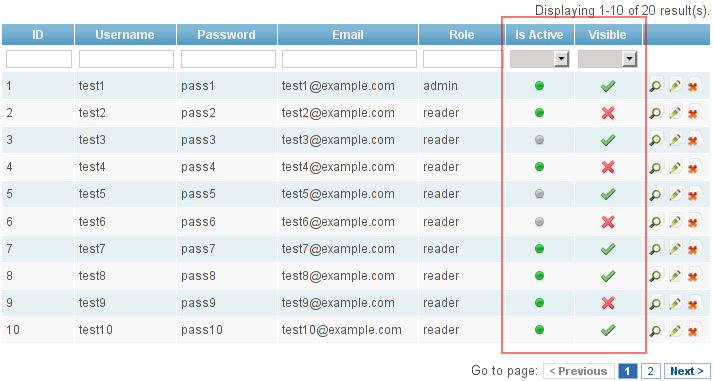
Column for CGridView which toggles the boolean ( TINYINT(1) ) value of model attribute. Tested with Yii 1.10.
Example 
History 
24.04.2012 - first release
25.04.2012 - added filter option and is now using assets
17.06.2012 - added ability to change action(two included: toggle(default) and switch), now using CActions
17.09.2012 - fixed bug with sorting, now sorts column in ajax way
19.02.2013 - New QtoggleAction allow toggles between range value!!!
04.07.2013 - Bug fix form KKK
GITHUB PAGE:
https://github.com/uniconstructor/jtogglecolumn
BITBUCKET PAGE: https://bitbucket.org/johonunu/jtogglecolumn/overview (less maintained for now)
Tutorial 
Extract downloaded zip to your components or extensions directory.
If you extracted to extensions directory add this line to import array in your /config/main.php :
<?php

'import'=>array(
    ...
    'application.extensions.jtogglecolumn.*',
)

?>
Define a JToggleColumn in your CGridView widget:
<?php

$this->widget('zii.widgets.grid.CGridView', array(
        'id'=>'language-grid',
        'dataProvider'=>$model->search(),
        'filter'=>$model,
        'columns'=>array(
                'id',
                'name',
                'lang_code',
                'time_format',
                array(
                                'class'=>'JToggleColumn',
                                'name'=>'is_active', // boolean model attribute (tinyint(1) with values 0 or 1)
                                'filter' => array('0' => 'No', '1' => 'Yes'), // filter
                                'htmlOptions'=>array('style'=>'text-align:center;min-width:60px;')
                ),
                array(
                                        'class'=>'JToggleColumn',
                                        'name'=>'is_default', // boolean model attribute (tinyint(1) with values 0 or 1)
                                        'filter' => array('0' => 'No', '1' => 'Yes'), // filter
                                        'action'=>'switch', // other action, default is 'toggle' action
                                        'checkedButtonLabel'=>'/images/toggle/yes.png',  // Image,text-label or Html
                                        'uncheckedButtonLabel'=>'/images/toggle/no.png', // Image,text-label or Html
                                        'checkedButtonTitle'=>'Yes.Click to No', // tooltip
                                        'uncheckedButtonTitle'=>'No. Click to Yes', // tooltip
                                        'labeltype'=>'image',// New Option - may be 'image','html' or 'text'
                                        'htmlOptions'=>array('style'=>'text-align:center;min-width:60px;')
                ),
                array(
                        'class'=>'CButtonColumn',
                ),
        ),
));

?>
Add action(s) in your controller:
<?php

public function actions(){
    return array(
            'toggle'=>'ext.jtogglecolumn.ToggleAction',
            'switch'=>'ext.jtogglecolumn.SwitchAction', // only if you need it
            'qtoggle'=>'ext.jtogglecolumn.QtoggleAction', // only if you need it
    );
}

?>
Don't forget to add this action to controllers accessRules:
<?php

public function accessRules()
{
        return array(
                array('allow',
                        'actions'=>array('toggle','switch','qtoggle'),
                        'users'=>array('admin'),
                )
        );
}

?>
New Qtoggle usage demo:
<?php
$this->widget('zii.widgets.grid.CGridView', array(
        'id'=>'language-grid',
        'dataProvider'=>$model->search(),
        'filter'=>$model,
        'columns'=>array(
                'id',
                'name',
                'lang_code',
                'time_format',
                array(
                                'class'=>'JToggleColumn',
                                'action'=>'qtoggle',
                                'name'=>'answer',
                                'filter' => array('no' => 'No', 'yes' => 'Yes','dn' => 'Don`t know'),
                                'queue'=>array('no' => '<span class="green">No</span>', 'yes' => '<span class="red">Yes</span>','dn' => '<span class="gray">???</span>'),//key-label pairs
                                'queueTitles'=>array('no' => 'No', 'yes' => 'Yes','dn' => 'I don`t know'),//key-tooltips pairs
                                'labeltype'=>'html',
                                'htmlOptions'=>array('style'=>'text-align:center;min-width:60px;')
                ),
                array(
                                        'class'=>'JToggleColumn',
                                        'filter' => array('0' => 'Draft', '1' => 'Premod',2=>'Public','3'=>'Archive'), // filter
                                        'name'=>'status',
                                        'action'=>'qtoggle',
                                        'queue'=>array('0' => '/images/toggle/draft.png', '1' => '/images/toggle/premod.png',2=>'/images/toggle/pub.png','3'=>'/images/toggle/arch.png'),
                                        'queueTitles'=>array('0' => 'Draft. Toggle to premod', '1' => 'Premod. Toggle to public',2=>'Public. Toggle to archive','3'=>'Archive. Toggle to draft'),
                                        'labeltype'=>'image',
                                        'htmlOptions'=>array('style'=>'text-align:center;min-width:60px;')
                ),
                array(
                                                            'class'=>'JToggleColumn',
                                                            'filter' => array('0' => 'Draft', '1' => 'Premod',2=>'Public','3'=>'Archive'), // filter
                                                            'name'=>'varsel',
                                                            'action'=>'qtoggle',
                                                            'queueType'=>'select',  //Show all options in dropdownlist
                                                            'queue'=>array('0' => 'Opt1', '1' => 'Opt2',2=>'Opt3','3'=>'Opt4'),
                                                            'queueTitles'=>array('0' => 'Opt1', '1' => 'Opt2',2=>'Opt3','3'=>'Opt4'),
                                                            'labeltype'=>'text',
                                                            'htmlOptions'=>array('style'=>'text-align:center;min-width:60px;')
                                    ),
                array(
                        'class'=>'CButtonColumn',
                ),
        ),
));

?>
nice extension
Ahaaa...nice extension.. great works, master Yii...
very nice extension
I made small improvements:
I added actionToggle to Controller class (all my controllers extends this class) and I changed it to:
public function actionToggle($id, $attribute, $model) {
        if (Yii::app()->request->isPostRequest) {
            $model = $this->loadModel($id, $model);
            //loadModel($id, $model) from giix
            ($model->$attribute == 1) ? $model->$attribute = 0 : $model->$attribute = 1;
            $model->save();
... //
JToggleColumn.php
public $model;

//in protected function initDefaultButtons()

   $this->toggle_button = array(
            'url' => 'Yii::app()->controller->createUrl("toggle",array("id"=>$data->primaryKey,"attribute"=>"' . $this->name . '","model"=>"'.$this->model.'"))',
            'options' => array('class' => $this->name . '_toggle'),
        );
In admin column:
'model' => get_class($model),Now it's universal for different models.
Second improvement:
admin:
'filter' => array('0' => Yii::t('app', 'No'), '1' => Yii::t('app', 'Yes'))JToggleColumn.php
public $filter;

    protected function renderFilterCellContent() {

        if ($this->filter !== null) {
            if (is_string($this->filter))
                echo $this->filter;
            else if ($this->filter !== false && $this->grid->filter !== null && $this->name !== null && strpos($this->name, '.') === false) {
                if (is_array($this->filter))
                    echo CHtml::activeDropDownList($this->grid->filter, $this->name, $this->filter, array('id' => false, 'prompt' => ''));
                else if ($this->filter === null)
                    echo CHtml::activeTextField($this->grid->filter, $this->name, array('id' => false));
            }
            else
                parent::renderFilterCellContent();
        }
    }
Now we can use filters.
Respect!!!
Great idea!
But endorse improvments of Pawel Kania
public function actionToggle($id,$attribute) { if(Yii::app()->request->isPostRequest) { $model = $this->loadModel($id); $model->$attribute = ($model->$attribute==0)?1:0; $model->save(); //....... }Thanks
@CyberMama
Thanks! Forgot to update, fixed :)
so
so. i kill your password with it
$model = $this->loadModel($id); $model->$attribute = ($model->$attribute==0)?1:0; $model->save();@nizsheanez
@nizsheanez
> > so. i kill your password with it
This isn`t bug of extension.
You have to create some different scenarios for User model
However you can try
$model = $this->loadModel($id); $state = ($model->$attribute==0)?1:0; $model->saveAttributes(array($attribute=>$state));so
i can set $attribute at all of fields, and save 0 or 1 there. It's no good.
bypass validation
If you are experiencing validation errors in a JS alert box, you'll have to bypass validation.
in the function actionToggle() replace:
by:
$model->save(false);primaryKey
I love this little extension, easy to work with. However, I do have one request, could there be any way to have a more flexible primary key detection/selection? (and with that, also taking away the requirement of activeDataProvider)
@Patrigan
Thanks, I'm glad you like it ;) I am quite busy, but I'll see what I can do! My code is at bitbucket, so if you anyone have time, please contribute ;)
Switch action
Can you add an example of what the switch action precisely does?
Switch action
@Patrigan
the switch action doesn't do anything special. I'll give you an example; if you need to have boolean column and you would like only one row to be active, while others unactive, you'll use switch action. For example you have language table and column "is_default"; only one language can be default right, so you'll use this action (switch). When you check other language to be default, the default one would reset. If you would use toggle action you could potentionaly have, for example, three default languages. I hope I explained well, sorry for bad english ;)
BUG in JToggleColumn
In line 330:
if($this->action==qtoggle AND $this->queueType=='select')
should be:
if($this->action=='qtoggle' AND $this->queueType=='select')
GitHub page
Hello, johonunu.
Thank you for this extension.
Unfortunatly I was not found official github repository for this project, but I see so many code improvements here.
For now, I've created my own repo: https://github.com/uniconstructor/jtogglecolumn
I will try to add all bugfixes and improvements from this thread to here.
Everyone: feel free to contribute.
@__construct()
@__construct()
Hi I didn't noticed tha last two comments on this page. I have a github account, but the source code is located at bitbucket: https://bitbucket.org/johonunu/jtogglecolumn/overview
Anyway I am quite busy, so I missed the last bug :( It is nice that you want to continue maintaining and improving my extension. Thnak you very much and keep up the good work ;)
P.S. I will add your github page in the info section.
@johonunu
@johonunu
Oh, excuse me, I didn't noticed that your code is located in the bitbucket.
I am subscribed to your bitbucket now and will keep my repo syncronized with yours.
Jtoggle column with Giix
Click Here for more information
If you have any questions, please ask in the forum instead.
Signup or Login in order to comment.