

Image Gallery1 
by:
Christian Salazar. christiansalazarh@gmail.com @yiienespanol, dic. 2012.
![Screen Capture] (https://bitbucket.org/christiansalazarh/imagegallery1/downloads/screenshot.png "Screen Capture")
http://opensource.org/licenses/bsd-license.php
Requirement: 
Yii 1.1.11
What it does ? 
This widget Presents an image list (css & jQuery based) containing a delete icon and a select radio button for each image passed in the 'image' argument.
The Delete button: Is a button located at the bottom-right of each image, when pressed an action is fired, is your responsability to delete the referenced image on server side.
The Select radio button: Is located at the left-bottom of each image, when clicked an action is fired and is your responsability to make it the default image for your model.
Usage 
Insert and configure the Widget. 
$this->widget('ext.imagegallery1.ImageGallery1',array(
	'images'=>array("<img alt='120' src='bla'>",...more images....),
	'action'=>array('/site/myaction'),
	'modelId'=>'article12',		// $model->primarykey (as an example)
	'selectedImageId'=>'120',	// the ID for your image...any unique ID
	'onSuccess'=>'function(data){  }',
	'onError'=>'function(e){ alert(e);  }',
));
Handling the request. 
/**
	 	the widget invokes this action whenever a user press the delete
		button or the select radio button.

		arguments:

		$action:	'delete' or 'select'.
		$modelid:	the same value passed to the widget in 'modelId'.
		$id:		the unique id image identificator.

		you must act in response to $action.
	 */
	public function actionMyAction($modelid, $id, $action){
		// ..do something based on the $action argument
		/
		if($action == 'select') { ..mark the image $id as default..  }
		if($action == 'delete') { ... delete the image ref by $id... }
	}
 bluyell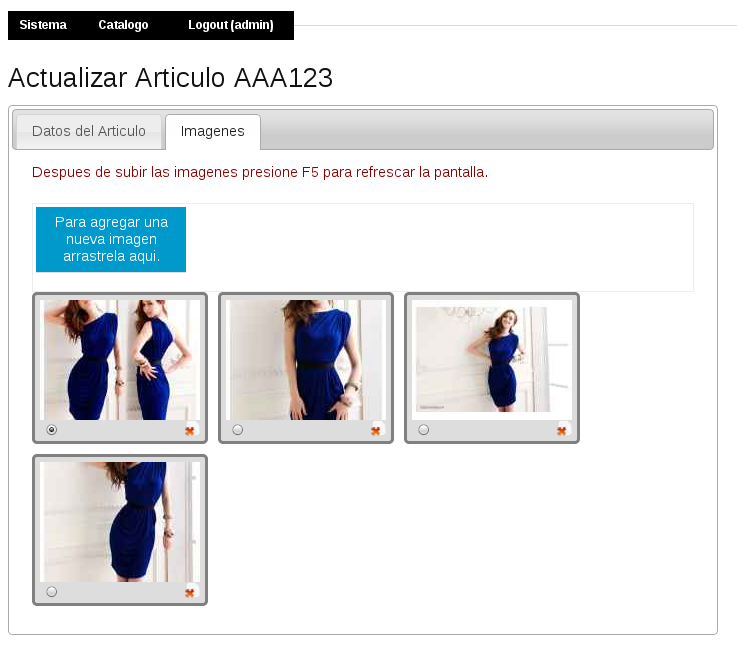
User Contributed Notes 1
About adding new images
The top-left blue button labeled "To add more images.." ([ES] "Para agregar una una nueva imagen...") is an instance of another widget named: Coco Ajax File Uploader
Leave a comment
If you have any questions, please ask in the forum instead.
Join the conversation to share a note.