

This is an email extension. Allows fields such as BCC, CC, Reply-to addresses, and others. Also has an excellent debug mode, in which the extension does not actually send emails, but instead outputs it to the screen.
I have written a new mail extension for yii, which I believe to be superior to this one. Here it is
Documentation 
Requirements 
- Yii 1.0.2 or above
Installation 
- Extract the release file under
protected/extensions
Usage 
You can configure the extension as follows:
'components'=>array(
	'email'=>array(
		'class'=>'application.extensions.email.Email',
		'delivery'=>'php', //Will use the php mailing function.
		//May also be set to 'debug' to instead dump the contents of the email into the view
	),
...
You need to put the debug widget somewhere in the view or layout, if you wish to use debug mode
<?php $this->widget('application.extensions.email.debug'); ?>
Example code:
$email = Yii::app()->email;
$email->to = 'admin@example.com';
$email->subject = 'Hello';
$email->message = 'Hello brother';
$email->send();
Instead of defining the message with $email->message, you could instead define a view (and layout if you wish) to use as the email content. This is much more flexible and maintains MVC better.
Change Log 
January 12, 2009 
- Initial release 1.0
January 23, 2009 
- Updated to support multi-byte and different languages.
January 24, 2009 
- 2nd attempt to support multi-byte.
 jonah
jonah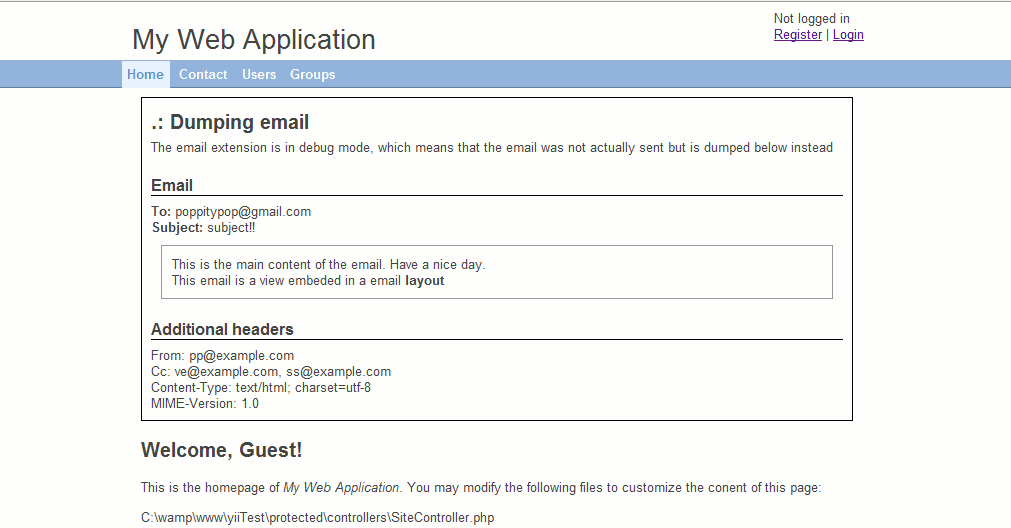
User Contributed Notes 14
send a view into $email->message
You said in your documentation:
"Instead of defining the message with $email->message, you could instead define a view (and layout if you wish) to use as the email content. This is much more flexible and maintains MVC better."
Please, could you be kind to write a little strip code to get it?
Thanks.
Really good
I've realised I use this extension in every project now. Excellent work.
Still getting Error with encoding
I get an error of call to undefined function. I also tried the suggestion from above:
"if you have error with encoding -> after line 139 mb_language($this->language); insert
mb_internal_encoding($this->contentType);"
It looks like I may not have something installed on my machine. I have Windows 7 x64 with standard install of php. Could I be missing something?
Error with encoding - thank you r0n9.GOL
Thank you lot. Your tip is perfect.
Headers with problems
I have some problems with headers, because the separator is \r\n and it should be just \n.
Some email clients separate \r\n in two lines, so they email get it like this, and it doesn't work!:
Content-Type: text/html; charset=utf-8
MIME-Version: 1.0
Mime-Version: 1.0
Content-Transfer-Encoding: BASE64
...
Error with encoding
if you have error with encoding ->
after line 139
mb_language($this->language);
insert
mb_internal_encoding($this->contentType);
Works very well :)
Thank you for this plugin !
Just a typo in the documentation for the debug widget, it's 'application.extensions.email.Debug' (debug will fail on linux)
Very good but can be improved ;-)
The plugin works great but you can improve it by allowing user to give two different view, one for HTML and one for plain text. Then you should update the content type of the email according to the given view.
I also have problem with the content encoding. I'll look into this issue and give a feedback ASAP.
.
you mean replyTo?
$email->replyTo = 'namename@email.com';
Debug sender data
How to add sender data in debug?
<?php
$email->from = 'namename@email.com';
$email->to = 'adminNameadmin@example.com';
$email->subject = 'Hello';
$email->message = 'Hello brother';
Using views when send mail
Studying a bit the file /protected/extensions/email/Email.php, I get the method to manage views in body messages:
First of all, we call the mail method from your controller or model:
$email = Yii::app()->email;
$email->to = 'to@mail.com';
$email->subject = 'Subject text';
$email->view = 'myview';
$email->viewVars = array('var1'=>$var1,'var2'=>$var2);
$email->send();
Next, you need to create the view in /protected/views/email/myview.php
File /protected/views/email/myview.php:
Some email vars:<br>
Email:<?php echo $email->subject ?>
<br>
From:<?php echo $email->from ?>
<br>
Now, my own vars:<br>
Var1:<?php echo $var1 ?>
<br>
Var2:<?php echo $var2 ?>
Just only that.
Sending email takes much time!!
hi there,
The extension works great! The only problem that i faced when i hosted my app online for testing is that once the email function is invoked in the controller , i receive the email after a couple of hours rather than instantly, i have tried it many times , but no changes at all, not even once get an instant email.
I have hosted my app in my sub-domain. Will it be a cause for this issue or is it something to do with the extension?
Lemme know if anybody else have this problem or anyways to get around it..!
Thanks..!
attachment issue with email extension
can i attach the file with this email extension??????
attachment issue
hello please tell me how can we send attchment ?
Leave a comment
If you have any questions, please ask in the forum instead.
Join the conversation to share a note.