
Introduction 
EDateRangePicker is a very simple widget that encapsulates the amazing Date Range Picker plugin developed by Filament Group.
The plugin worked with jquery.ui.v1.6 and jquery.v1.5.3 so I updated the plugin to work with latests versions of jquery.ui.v1.8 and jquery.v1.6 and also fixed some bugs on its logic to work with Yii.
So, remember that it is a modified version of the plugin and any feedback on its bugs will be highly appreciated.
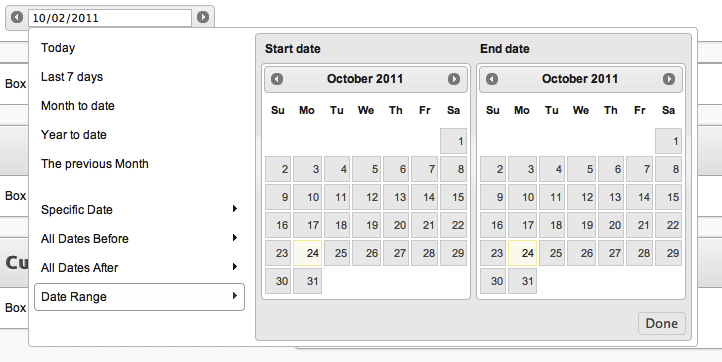 I have created a GitHub repository for those willing to contribute on any of the extensions I created. Please, check the link at the bottom of this wiki.Usage 
The following code assumes that you have unzipped and extract the contents on your extensions folder.
<?php
$this->widget('ext.EDateRangePicker',array(
	'id'=>'Filter_date',
	'name'=>'Filter[date]',
	'value'=>'10/02/2011',
	'options'=>array('arrows'=>true),
	'htmlOptions'=>array('class'=>'inputClass'),
	));
?>
Resources 
Change Log 
version 1.0.1 
- Initial Public Release
version 1.0.2 
- Fixed inclusion path (thanks jpablo78)
version 1.0.3 
- Enhanced the plugin to work with multiple instances (thanks jpablo78)
version 1.0.4 
- Enhanced the plugin with internationalization. Note that custom menu options require direct modification of the plugin javascript file (see its code).
version 1.0.5 
- Enhanced the plugin with collision detection (top/bottom/left)
Great extension! but I found a little bug
This ext is cool! But I was unable to run it out of the box, it's an issue related to the DIRECTORY_SEPARATOR (used at the end of the script).
I replaced DIRECTORY_SEPARATOR with '/' and the ext runs fine under linux.
With DIRECTORY_SEPARATOR I found that the separator used was the backslash '\', and it's not OK for URL construction, like the CSS path and .JS path.
I will try to figure out how to use it to filter a CGridView by a date column. If you have any instruction or advise on it, I will very appreciate your sharing =)
@jpablo78
Wow! What a silly bug! Thanks for pointing that out jpablo78. Now is updated.
@Raoul
Internationalization comes with datepickerOptions within options, and you set them as you do with datepicker. Please, refer to its documentation.
Issue when using two date fields with this component
I tried to use the DateRangePicker in two fields of a form, but had an issue: The second componente sets the date in the INPUT field of the first component.
This is the code:
$this->widget('EDateRangePicker',array(
'id'=>'AdvSrchArea_fec_fin',
'name'=>'Area[fec_fin]',
'options'=>array( 'dateFormat'=>'dd/mm/yy'),
'htmlOptions'=>array('class'=>'datefieldlong'),
));
$this->widget('EDateRangePicker',array(
'id'=>'AdvSrchArea_fecha',
'name'=>'Area[fecha]',
'options'=>array( 'dateFormat'=>'dd/mm/yy'),
'htmlOptions'=>array('class'=>'datefieldlong'),
));
maybe I'm doing something wrong? I'm using different IDs and names.
@pablo78
You are right, there is an issue working with multiple instances. Fixing it asap.FIXED... please, let me know if you find any bugs (use the forum :) )
Great extension, but can I put the widget inline?
This module looks great, but is there a way I can include it inline? I am using it on a search page, and the layout I am using has all the input on the same line as the label. When I try to put the module on the same line as the label, the label gets absorbed into the picker.
For example, in the code below the open_date label does not display.
<div class="row">
                <?php echo $form->label($model,'open_date'); ?>
		<?$this->widget('ext.EDateRangePicker',array(
                                'name'=>'open_date_range',
                                'options'=>array('arrows'=>true),
                                ));?>
	</div>
Is there a way to put this picker in the same line as something else, or do I have to put it on a different line using br tags?
How to get preset options?
what line should i add to show the preset options?
If you have any questions, please ask in the forum instead.
Signup or Login in order to comment.